

|




Newest Toyota GTS+ Global Techstream Plus Software Download and Activate Work with J2534


-
- Product Name: Newest Toyota GTS+ Global Techstream Plus Software Download and Activate Work with J2534
- Item NO.: 29564087
- Weight: 0 kg = 0.0000 lb = 0.0000 oz
- Category: ALL CATEGORIES > Diagnostic Software Update
- Creation Time: 2026-10-27
one order only support one computer, because our price is very low, one computer is activated for one year. If the subscription expires or you change the computer, you need to pay again.
GTS+ Offline is updated periodically.Each update adds support for additional vehicle models and model years.For every new order, we directly install the latest version available at that time.If you already have the software installed but a new version becomes available, you can contact us for a paid upgrade, or renew it after your one-year license expires.one order only support one computer, because our price is very low, one computer is activated for one year. If the subscription expires or you change the computer, you need to pay again.
how to install?
after place order, you need send us remote control, we have engineer install it for you.
if you don't accept we install it for you, please don't place order
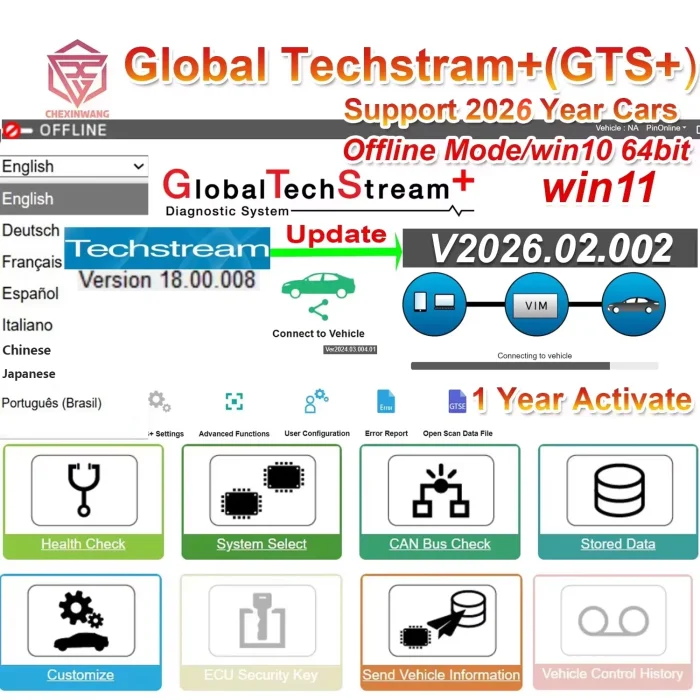
Toyota Techstream 2026 Global TechStream Plus (GTS+) is an OEM-level diagnostic software solution designed for Toyota and Lexus vehicles. Version 2026.02.002 provides a range of diagnostic and service functions for professional automotive workshops, technicians, and vehicle specialists.
When used with a compatible J2534 PassThru interface, GTS+ can communicate with supported vehicle electronic control units (ECUs), helping technicians identify faults, monitor live data, perform active tests, and access available service functions.
Compared with older Techstream software versions, this GTS+ release is advertised with broader vehicle coverage, including selected models through early 2026. Actual coverage depends on the vehicle model, production year, ECU configuration, software installation, and interface compatibility.
For workshops that regularly service Toyota and Lexus vehicles, GTS+ can be a useful addition to an existing diagnostic setup.
Key Product Information
-
Software: Global TechStream Plus (GTS+)
-
Version: 2026.02.002
-
Supported Brands: Toyota, Lexus, Scion where supported by the software and vehicle configuration
-
Operating System: Windows 10 64-bit recommended
-
Interface: Compatible J2534 PassThru devices
-
Working Mode: Offline operation for supported functions
-
Languages: English, French, German, Spanish, Italian, Portuguese, Japanese, and Chinese
-
Security Functions: Security Key functions are not supported
Key Features of Toyota Techstream 2026
1. Full-System Vehicle Diagnostics
Toyota Techstream 2026 GTS+ helps technicians diagnose supported electronic systems throughout a vehicle. Depending on the vehicle and connected interface, available modules may include the engine, transmission, ABS, airbag, body control, and other electronic systems.
Read and Clear Diagnostic Trouble Codes
Technicians can read diagnostic trouble codes (DTCs) stored in supported ECUs and clear codes when the underlying problem has been addressed. This helps narrow down potential faults and verify repair results.
Code clearing does not repair the original fault, and some codes may return if the problem remains.
2. Live Data Monitoring
The live data function allows technicians to view real-time parameters reported by supported vehicle systems.
Examples may include engine speed, coolant temperature, sensor readings, fuel-related parameters, and other ECU data, depending on the vehicle.
Support for Troubleshooting
By monitoring live data while the engine is running or during a diagnostic procedure, technicians can compare actual readings with expected values and identify unusual behavior. This can make fault diagnosis more efficient than relying on fault codes alone.
3. Active Tests and Bidirectional Control
For supported vehicles and ECUs, GTS+ may provide active tests that allow technicians to command specific components or systems and observe their responses.
These functions can help verify whether a component operates correctly and distinguish between electrical, mechanical, and control-related problems.
Available tests vary by model and ECU. Always follow the manufacturer's service procedures before activating vehicle components.
4. Service and Maintenance Functions
Depending on the vehicle configuration, the software may provide selected service functions for routine workshop maintenance.
Potential functions include:
-
Maintenance-related resets
-
Electronic parking brake service operations
-
Selected calibration procedures
-
Battery-related service functions
-
Available ECU utility operations
Not every function is available for every Toyota or Lexus vehicle. Confirm the supported functions for the specific model before purchasing.
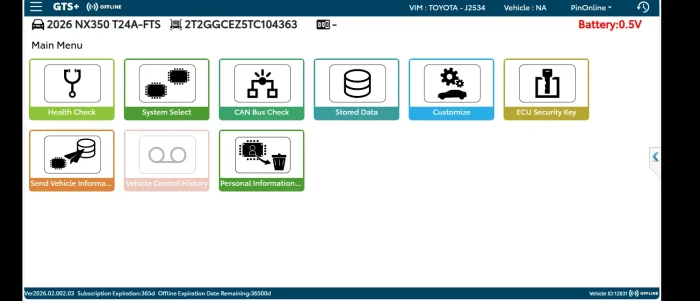
5. Vehicle Health Check and VIN Identification
Where supported, vehicle identification can help technicians identify the connected vehicle and access the appropriate ECU diagnostic options.
A health check can provide an overview of supported electronic systems and their diagnostic status. This is useful for preliminary inspections, routine maintenance, and post-repair verification.
6. ECU Configuration and Customization
GTS+ may provide access to supported ECU configuration and vehicle customization options. Available settings depend on the vehicle platform, ECU, and software permissions.
Advanced functions should only be performed by qualified technicians. Incorrect configuration or interrupted procedures may affect vehicle operation.
Toyota Techstream 2026 vs. Older Techstream Versions
Toyota Techstream 18.00.008 is commonly associated with vehicle coverage through approximately the 2023 model year in the supplied product information. Global TechStream Plus 2026.02.002 is advertised as extending coverage to selected vehicles through early 2026.
Feature Techstream 18.00.008 Global TechStream Plus 2026 Software version 18.00.008 2026.02.002 Advertised vehicle coverage Through approximately 2023 Selected models through early 2026 Vehicle brands Toyota and Lexus, depending on configuration Toyota and Lexus, with Scion coverage where supported J2534 interface Depends on setup Compatible supported J2534 devices Diagnostic functions Depends on vehicle and ECU Depends on vehicle and ECU Security Key functions Depends on authorized software and access Not supported by this product The newer version may be more suitable for workshops working with newer vehicles. However, a newer software version does not guarantee compatibility with every vehicle released in 2026. Confirm the exact model, production date, and required functions before ordering.
Supported Vehicles and Brands
Toyota
GTS+ is designed for supported Toyota passenger cars, SUVs, and light commercial vehicles. Coverage varies by model generation, ECU type, and vehicle market.
Lexus
The software also supports diagnostic and service operations on compatible Lexus vehicles. Available functions depend on the individual vehicle and its electronic systems.
Scion
Scion coverage may be available for supported models and configurations. Buyers should verify compatibility for the specific vehicle rather than assuming universal coverage.
Important Note About Vehicle Coverage
The advertised coverage through early 2026 refers to supported vehicle applications, not a guarantee that every 2026 model or every ECU is compatible. Functions can differ between regional versions and vehicle configurations.
J2534 Interface Compatibility
Toyota Techstream 2026 GTS+ is designed to work with supported J2534 PassThru diagnostic interfaces. The interface provides the communication link between the Windows computer and the vehicle.
Compatible Interface Options
Depending on the hardware version, drivers, and configuration, compatible interfaces may include:
-
VXDIAG J2534 interfaces
-
Tactrix diagnostic interfaces
-
Other supported J2534 PassThru devices
Compatibility should be verified before installation. A device that supports the J2534 standard is not automatically guaranteed to work with every GTS+ function.
Interface Setup Considerations
Before connecting to a vehicle, install the correct interface drivers and verify that the device is recognized by the computer. An older Denso VIM is not supported according to the supplied product information.
For reliable communication, use a stable USB connection where recommended and maintain adequate vehicle battery voltage during diagnostic operations.
Important Limitation: Security Key Functions
Toyota Techstream 2026 GTS+ does not support the Security Key function according to the supplied specifications.
This limitation is important for workshops that perform advanced security-related operations. Certain key programming, immobilizer functions, protected ECU operations, and ECU reprogramming procedures may require authorized online access, additional credentials, or other official Toyota service systems.
Do not purchase this software on the assumption that it can perform every dealer-level security operation. Check your required functions before placing an order.
System Requirements for Toyota Techstream 2026 GTS+
A compatible Windows computer is necessary for installation and stable operation.
Recommended Computer Specifications
Item Requirement or Recommendation Operating system Windows 10 64-bit recommended Processor Intel Core i5 or better recommended Memory 8 GB RAM or more recommended Minimum memory 4 GB RAM Storage 10 GB or more recommended Minimum disk space Approximately 5 GB .NET Framework Version 4.7.2 Browser Compatible Chrome, Edge, or Firefox version Permissions Administrator rights Interface Supported J2534 PassThru device The supplied information contains conflicting Windows 11 compatibility statements. Although Windows 11 64-bit is mentioned in one section, another section states that Windows 11 is not supported. For this reason, Windows 10 64-bit is the safer recommended choice unless Windows 11 compatibility has been confirmed with the seller.
Additional Installation Requirements
-
Ensure that the computer has sufficient free disk space.
-
Install the required .NET Framework components.
-
Use a supported browser version if required by the installation or activation process.
-
Allow the necessary network access for installation or activation where applicable.
-
Confirm that the computer has administrator permissions.
-
Verify interface driver compatibility before connecting to the vehicle.
Installation and Setup Service
The product package may include software installation assistance and interface configuration, depending on the seller's offer.
What May Be Included
-
Toyota Techstream 2026 GTS+ software
-
Standalone activation advertised as valid for 12 months
-
Remote installation and system configuration
-
J2534 interface setup and compatibility checks
-
Quick-start guide or reference handbook
-
One month of installation-related technical support
-
Remote assistance through AnyDesk, with the customer's permission
The stated 12-month activation period, one-PC license, installation timeline, and support terms should be confirmed with the seller before purchase. Activation arrangements may vary by supplier.
Before Installation
Prepare a compatible Windows computer and a supported J2534 interface. Back up important files, close unnecessary applications, and ensure a stable internet connection if remote installation or activation is required.
Only allow remote access to a trusted technician, and supervise the session while access is active.
Why Choose Toyota Techstream 2026 GTS+?
Designed for Professional Workshop Use
GTS+ provides access to supported Toyota and Lexus diagnostic systems, making it useful for workshops that regularly maintain these vehicle brands.
Broad Diagnostic Capabilities
Fault-code reading, live data, active tests, and selected service functions can help technicians investigate faults and verify repairs.
Support for Compatible J2534 Devices
Using a supported PassThru interface can help workshops integrate the software into an existing diagnostic setup without relying on a single dedicated interface model.
Multilingual Interface
Support for eight listed languages makes the software accessible to technicians in different regions, subject to the language options available in the installed release.
Coverage for Selected Newer Vehicles
The 2026.02.002 release is advertised with expanded coverage for selected models through early 2026. Verify the exact vehicle application before ordering.
Frequently Asked Questions
Is Toyota Techstream 2026 GTS+ compatible with Windows 11?
Windows 11 64-bit is mentioned in part of the supplied specifications, but another section states that it is not supported. Windows 10 64-bit is the recommended option until the seller confirms compatibility with your specific Windows 11 installation.
Which vehicles does GTS+ support?
The software is designed for Toyota and Lexus vehicles, with Scion coverage where supported. Actual compatibility depends on the model, year, ECU, and available software functions.
Can GTS+ work with a J2534 interface?
Yes, it is designed for supported J2534 PassThru devices. However, individual interfaces may differ in driver compatibility and supported functions, so confirm the exact device before purchase.
Does GTS+ support key programming and immobilizer functions?
The supplied specifications state that the Security Key function is not supported. Some security-related operations require official online access, additional authorization, or other service tools.
Can I use GTS+ offline?
The product is advertised for offline operation for supported functions. Certain activation, protected service, security-related, or ECU programming operations may require an internet connection or official authorization.
Is the activation permanent?
The supplied package information advertises standalone activation valid for 12 months. This is not the same as permanent activation. Confirm the license period and renewal terms with the seller.
Does it support every 2026 Toyota and Lexus model?
No universal coverage guarantee is provided. The software is advertised for selected vehicles through early 2026, and exact compatibility should be checked by model, production date, and ECU.
What computer should I use?
A Windows 10 64-bit computer with an Intel Core i5 processor, 8 GB RAM, and an SSD is recommended. You should also install the required .NET Framework and compatible interface drivers.
Final Thoughts
Toyota Techstream 2026 Global TechStream Plus (GTS+) is a diagnostic software option for workshops and technicians working with compatible Toyota and Lexus vehicles. Its main strengths are access to supported ECU diagnostics, live data, active tests, selected service functions, and compatibility with supported J2534 PassThru interfaces.
Before purchasing, confirm vehicle coverage, interface compatibility, operating system support, activation duration, and the Security Key limitation. Choosing the right setup for your workshop will help you avoid compatibility issues and make better use of the software's available diagnostic functions.
You May Also Like
-
 MEDC17 EGPT PINOUT TOOL v1.4 BOSCH ECU Pinout W...US$ 21.51 US$ 23.90
 -
 2025.03 C4 Software For Mb Star C4 New SSD For ...US$ 89.10 US$ 99.00
 -
 TIS Techstream 18.00.008 software Activate Code...US$ 9.90 US$ 15.00
 -

-
 2025 Consult 3 Ⅲ Plus V241 Diagnostic Software ...US$ 80.10 US$ 89.00
 -
-
 Newest Autocom 2021.11 and Delphi 2021.10b Hot ...US$ 10.20 US$ 12.00
 -
 Newest Full Software Xentry Vediam/DTS /WIS EPC...US$ 89.10 US$ 99.00
Recently Viewed
-
 Porsche OBD2 Scanner External Equipment Automob...US$ 80.10 US$ 89.00
 -
 Autel MaxiFlash VCI J2534 ECU Programmer OEM Pa...US$ 539.10 US$ 599.00
 -
 Caterpillar CAT ET 2026A Version Software Remot...US$ 79.20 US$ 88.00
 -
 Obd Diagnostic Cable Module S1279 Interface for...US$ 35.10 US$ 39.00
 -
 CAN Test Box OBD2 Breakout Box and Protocol Det...US$ 89.10 US$ 99.00
 -
 JLR Mangoose SDD V164 Auto Diagnostic ScabTool...US$ 62.91 US$ 69.90
 -
 Cummins Inpower Pro Diagnostic Scanner V14.5 In...US$ 719.10 US$ 799.00
 -
 ECU Probe Programming Bracke Solderless Solutio...US$ 62.10 US$ 69.00
- Company Info
- Feedback
- Customer Reviews
- About Us
- Contact Us
- News
- User Center
- Forget Password
- My Orders
- Tracking Order
- My Account
- Register
- Payment & Shipping
- Customs & Taxes
- Locations We Ship To
- Shipping Methods
- Payment Methods
- Company Policies
- Return Policy
- Privacy Policy
- Terms of Use
Customer Reviews