

|


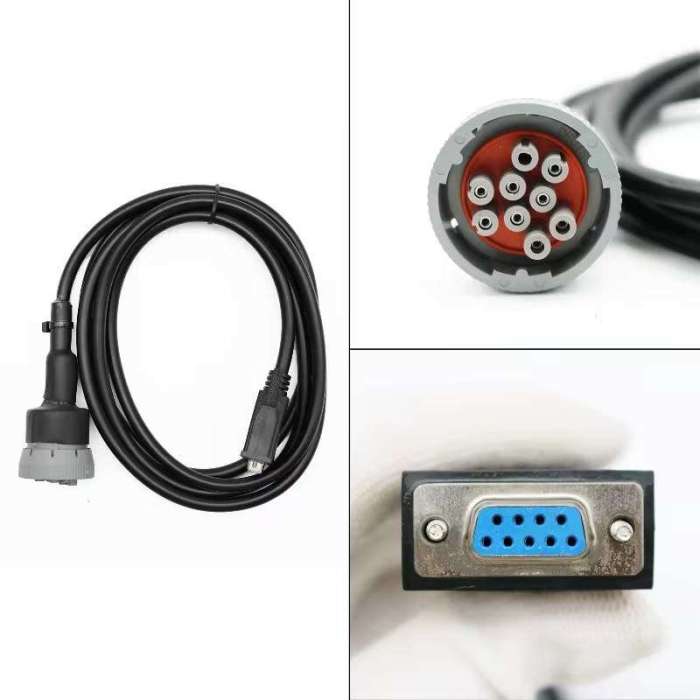


Cummins Inpower Pro Diagnostic Scanner V14.5 Incal Service Tool Software Komatsu Generator Set


-
- Product Name: Cummins Inpower Pro Diagnostic Scanner V14.5 Incal Service Tool Software Komatsu Generator Set
- Item NO.: 29495063
- Weight: 2 kg = 4.4092 lb = 70.5479 oz
- Category: ALL CATEGORIES > Hot Car Accessories
- Creation Time: 2026-09-17
What Is Cummins InPower Pro V14.5?
Cummins InPower Pro V14.5 is a professional service, diagnostic, monitoring, and configuration solution designed for Cummins power generation equipment. Unlike a conventional automotive OBD scanner, InPower Pro is primarily designed to work with Cummins PowerCommand generator set controls, transfer controls, and related system controllers.
The software provides a wide range of electronic service functions, including fault code viewing, real-time monitoring, parameter adjustment, strip-chart recording, data logging, report generation, controller configuration, and released firmware upgrades.
For technicians working with Cummins generator sets, the tool can provide access to important controller information and adjustment functions that are useful during installation, commissioning, troubleshooting, maintenance, and service.
Cummins InPower Pro V14.5 Application
The software belongs to the Cummins InPower family, which contains different software products for different power-generation applications.
Main Application Areas
- Cummins Generator Sets (Gensets)
- Generator Drive (G-Drive)
- Automatic Transfer Switches (ATS)
- PowerCommand control systems
- Related power generation system controls
Each InPower product is packaged separately and may use its own software security, serial number, and registration credentials depending on the application.
Cummins InPower Pro V14.5 Supported Engine Range
The InPower Pro V14.5 version described for this product is commonly marketed for Cummins generator applications involving engines such as QSX15, QSK23, QST30, and QSK60.
However, engine model alone should not be used as the only compatibility criterion.
Why Is the Controller Model Important?
InPower Pro is heavily focused on the electronic control system of the generator set. Therefore, the actual controller installed on the genset is an important factor when determining compatibility.
Common PowerCommand controller families associated with Cummins power generation applications include:
- PCC1100
- PCC1300
- PCC1301
- PCC1302
- PCC2100
- PCC2300
- PCC2300 V2
- PCC3200
- PCC3300
- PCC3300 V2
Other related HMI, AUX, MCC, MPC, ATS, and system-control devices may also be supported depending on the specific InPower configuration.
Check the Genset Controller Before Purchase
Before using InPower Pro V14.5, technicians should check the controller identification label on the generator set.
For example, a genset equipped with a PCC1300, PCC2100, or PCC3300 controller may require a different connection or feature configuration than another generator using a different PowerCommand controller.
Compatibility Note: The engine model, controller model, communication interface, software version, and authorization level can all affect the functions available to the user.
Cummins InPower Pro V14.5 Diagnostic Functions
One of the main purposes of InPower Pro is to provide technicians with access to generator control-system information.
Read and Analyze Fault Codes
InPower Pro can display current and historical fault information from supported control systems.
Fault Information Can Include
- Active faults
- Historical faults
- Alarm information
- Fault-related data
- Equipment operating information associated with faults
This allows technicians to identify abnormal conditions and investigate problems using information stored by the generator controller.
View Equipment History
The software can access equipment history stored within supported control systems.
Technicians can use historical information to understand previous alarms, faults, and operating conditions instead of relying only on the current fault status.
This can be especially useful when troubleshooting an intermittent problem that is no longer active when the technician arrives at the site.
Real-Time Cummins Genset Monitoring
InPower Pro also provides monitoring functions for supported generator equipment.
The software can display operating parameters from the connected control system and help technicians observe how the genset behaves under different operating conditions.
Monitor Critical Generator Parameters
Depending on the connected controller and configuration, monitored information can include parameters related to:
- Voltage
- Frequency
- Engine speed
- Generator operating status
- Protection settings
- Sensor information
- Controller status
- Other available operating parameters
Real-time monitoring can be useful during commissioning, maintenance, troubleshooting, and system verification.
Parameter Adjustment and Configuration
Another important feature of InPower Pro is access to configurable parameters within supported control systems.
Adjust Generator Control Parameters
The software can be used to adjust many available parameters, depending on the controller and user authorization.
Examples include:
- Voltage settings
- Frequency settings
- Gain settings
- Protection set-points
- Other configurable control values
These adjustments should be performed by qualified technicians who understand the generator's electrical and control-system requirements.
Configure Controller Inputs
InPower Pro can also provide programming capabilities for configurable controller inputs.
Why Input Configuration Matters
Generator controllers often need to interact with external monitoring devices, switches, alarms, and facility control systems. Configuring available inputs correctly allows the controller to respond to external signals according to the requirements of the installation.
The exact configuration options depend on the controller model and application.
Strip Chart and Data Logging
For troubleshooting and performance analysis, looking at one parameter at a single moment is often not enough.
InPower Pro provides Strip Chart functionality that allows critical parameters to be plotted over time.
Analyze Parameter Trends
A technician can use trend data to observe changes in operating parameters rather than simply checking individual readings.
For example, trend information may help identify:
- Abnormal voltage changes
- Frequency fluctuations
- Changes in operating conditions
- Intermittent problems
- Parameter changes during testing
Export Data for Further Analysis
Recorded data can also be exported for use with third-party software tools.
This makes the data useful beyond the InPower environment and can help technicians create more detailed service records or perform additional analysis.
Cummins Generator Diagnostic Reports
InPower Pro includes reporting capabilities for monitored equipment.
Generate Service Reports
Technicians can generate reports containing monitored or diagnostic information.
These reports can be useful for:
- Maintenance records
- Troubleshooting documentation
- Commissioning
- Customer service
- Equipment inspection
- Technical analysis
Keeping diagnostic records can also make it easier to compare equipment behavior before and after maintenance or parameter changes.
PowerCommand Controller Firmware Upgrade
InPower Pro can support released firmware upgrades for compatible PowerCommand genset controls.
Firmware Upgrade Considerations
Firmware programming is a more advanced operation than basic fault-code reading or data monitoring.
Before performing an upgrade, technicians should confirm:
- The exact PowerCommand controller model.
- The applicable firmware version.
- The correct communication connection.
- Stable power supply conditions.
- Appropriate software authorization.
- The compatibility of the firmware with the specific application.
An incorrect firmware file or interrupted programming process may affect controller operation, so firmware-related functions should be used carefully.
NFPA 110 Fault Simulation
One distinctive function described for InPower is the ability to simulate certain fault conditions in supported genset controls.
Test Generator Control and Monitoring Functions
Fault simulation can be used to demonstrate how the controller and monitoring equipment respond to specified fault conditions.
This capability can be useful during facility testing and verification, including applications related to NFPA 110 requirements.
Instead of waiting for an actual fault to occur, technicians can use supported simulation functions to verify whether the controller and monitoring system respond as expected.
InPower Pro Connection Methods
InPower provides several connection possibilities depending on the supported equipment and installation.
Direct PC Connection
A personal computer can be connected directly to compatible:
- PowerCommand genset controls
- Transfer controls
- System controls
This is a practical configuration for technicians performing service work directly at the generator or control cabinet.
Modem Connection
In supported applications, the software can communicate with generator or transfer-switch controls through a modem connection.
This can be useful for equipment where direct physical access is not the preferred service method.
PowerCommand Network Connection
InPower can also communicate with multiple supported controls through a PowerCommand/LONWorks network, depending on the system configuration.
This allows technicians to work with more complex power-generation installations containing multiple connected control devices.
User Access and Security
InPower provides configurable levels of user access.
Available Access Levels
Depending on the installation and authorization, access can be configured for:
- Read-only users
- Users who can read and change values
- Administrator-level users
This helps prevent unauthorized changes to important generator control parameters.
Why Access Control Matters
Parameters such as voltage, frequency, protection settings, and control logic can directly affect generator operation.
Restricting modification privileges can therefore help ensure that only authorized personnel can change critical settings.
InPower Pro vs. Cummins INSITE
It is important to understand that InPower Pro and Cummins INSITE are not the same type of service software.
InPower Pro
InPower Pro is primarily focused on Cummins power generation equipment and PowerCommand control systems.
Its functions include:
- Genset diagnostics
- Controller monitoring
- Parameter adjustment
- Fault history
- Data logging
- Strip charts
- Controller configuration
- PowerCommand firmware updates
- Generator-system testing
Cummins INSITE
Cummins INSITE is generally associated with Cummins engine electronic service and diagnostic applications, particularly for supported on-highway and industrial engine systems.
Therefore, when working on a Cummins generator set, technicians should first determine whether the required service task concerns the engine ECM or the generator's PowerCommand/control system.
Cummins InPower Pro V14.5 System Applications
The software can be particularly useful for professionals involved in the installation, maintenance, and servicing of Cummins power-generation systems.
For Generator Technicians
Technicians can use the software to read faults, monitor operating data, adjust supported parameters, and investigate abnormal equipment behavior.
For Generator Set Installation
During commissioning, InPower Pro can help technicians check controller settings and configure available parameters according to the installation requirements.
For Maintenance and Troubleshooting
Historical fault information, real-time monitoring, and data logging can provide additional information when diagnosing intermittent or complex generator problems.
For Facility Testing
The monitoring and fault-simulation capabilities can assist with testing generator control and monitoring functions in applicable installations.
How to Confirm InPower Pro V14.5 Compatibility
Before purchasing or installing the software, it is recommended to confirm the complete equipment information rather than relying only on the engine model.
Check These Four Items
1. Engine Model
Confirm whether the generator uses an engine such as:
- QSX15
- QSK23
- QST30
- QSK60
2. Controller Model
Check the PowerCommand controller identification, such as PCC1300, PCC2100, PCC2300, or PCC3300.
3. Communication Interface
Confirm which communication interface and connection method are required for the specific controller.
4. Software Authorization
Some InPower functions depend on the installed product package, serial number, registration credentials, user access level, and supported controller configuration.
Cummins InPower Pro V14.5 FAQ
Is InPower Pro V14.5 a Cummins generator diagnostic tool?
Yes. InPower Pro is designed as a service and diagnostic solution for supported Cummins power-generation equipment and PowerCommand control systems.
Does InPower Pro support QSX15 and QSK60 generator sets?
The V14.5 product configuration described here is marketed for Cummins genset applications including QSX15, QSK23, QST30, and QSK60. Actual compatibility should also be confirmed according to the installed generator controller.
Can InPower Pro read Cummins generator fault codes?
Yes. Supported systems can provide current and historical fault information, alarms, and associated diagnostic data.
Can InPower Pro change generator parameters?
Yes. Depending on the controller and user authorization, the software can adjust supported parameters such as voltage, frequency, gains, protection set-points, and other configurable values.
Can InPower Pro monitor generator data in real time?
Yes. It provides monitoring capabilities for supported equipment and can display available operating parameters from the connected control system.
Can InPower Pro perform PowerCommand firmware updates?
It can support released firmware upgrades for compatible PowerCommand genset controls. The exact upgrade capability depends on the controller, software package, firmware, and authorization.
Is InPower Pro the same as Cummins INSITE?
No. InPower Pro focuses primarily on Cummins power-generation equipment and control systems, while INSITE is a separate Cummins electronic service tool used for supported engine applications.
Final Thoughts
Cummins InPower Pro V14.5 is designed for professional servicing of Cummins power-generation control systems. Its combination of fault diagnostics, real-time monitoring, parameter adjustment, data logging, reporting, controller configuration, firmware upgrade support, and fault simulation makes it a comprehensive tool for supported PowerCommand applications.
For users working with Cummins QSX15, QSK23, QST30, QSK60 generator sets, the most important compatibility check is not simply the engine model. The PowerCommand controller model, communication method, software package, and authorization level should also be confirmed before use.
If you are selecting an InPower Pro V14.5 solution for a specific Cummins genset, checking the controller model and exact application first can help ensure that the required diagnostic and programming functions are supported.
You May Also Like
-
 WOYO CB007 CAN Tester 16 Pin Break Out Box Dete...US$ 89.10 US$ 99.00
 -
 MASTFUYI FY8912A Car Battery System Tester 12V ...US$ 53.10 US$ 59.00
 -
 GODIAG GT113 Fuel Injector Tester & Fuel Inject...US$ 53.10 US$ 59.00
 -
 FOXWELL SD201 Smoke Leak Detector Your All-in-O...US$ 116.10 US$ 129.00
 -
 Topdiag P180 Car Battery Tester 6-30V with Brea...US$ 125.10 US$ 139.00
 -
 CGDI CG70 Airbag Reset Tool - Non-Invasive Faul...US$ 719.10 US$ 799.00
 -
 QDB-4A Car Ignition Coil Tester Support Fault D...US$ 89.10 US$ 99.00
 -
 OBDSTAR MS50 Motorcycle Scanner Motorcycle Diag...US$ 539.10 US$ 599.00
Recently Viewed
-
 ECU Probe Programming Bracke Solderless Solutio...US$ 62.10 US$ 69.00
 -
 AIKKEY K3 OBD Key Programmer Review: CAN FD Sup...US$ 170.10 US$ 189.00
- Company Info
- Feedback
- Customer Reviews
- About Us
- Contact Us
- News
- User Center
- Forget Password
- My Orders
- Tracking Order
- My Account
- Register
- Payment & Shipping
- Customs & Taxes
- Locations We Ship To
- Shipping Methods
- Payment Methods
- Company Policies
- Return Policy
- Privacy Policy
- Terms of Use
Customer Reviews