

|


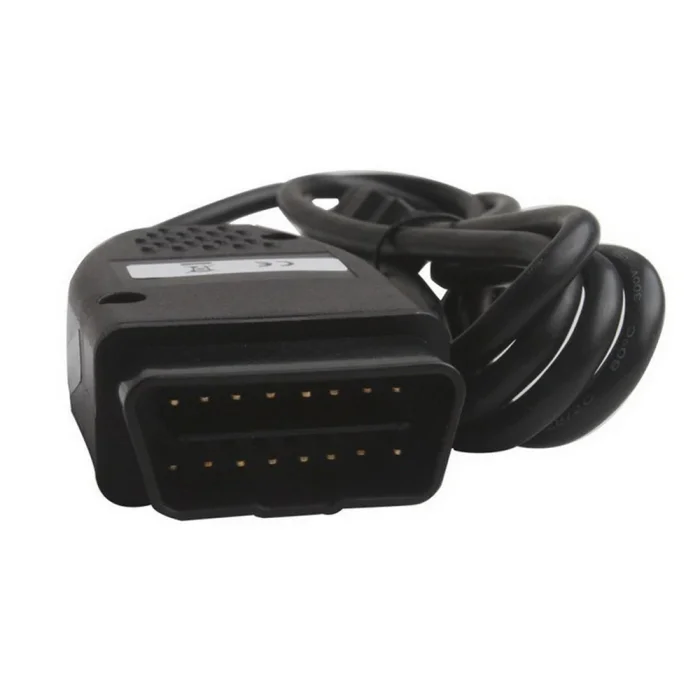

Porsche OBD2 Scanner External Equipment Automobile ECU Diagnostic Tool


-
- Product Name: Porsche OBD2 Scanner External Equipment Automobile ECU Diagnostic Tool
- Item NO.: 29545287
- Weight: 1 kg = 2.2046 lb = 35.2740 oz
- Category: Car Diagnostic Tools > For VW/Audi/Skoda/Porsche
- Creation Time: 2026-10-20
The Porsche Durametric OBD2 Diagnostic Cable is designed for vehicle owners, independent automotive workshops, and technicians who need to diagnose compatible Porsche models using a Windows XP computer. When paired with compatible Durametric diagnostic software, this cable provides access to vehicle diagnostic information beyond the limited engine-related data typically available through a standard OBD2 scanner.
Unlike basic OBD2 code readers that mainly focus on emissions-related engine faults, a compatible Durametric diagnostic setup can communicate with supported vehicle control systems and provide additional diagnostic information, depending on the vehicle model and installed software version.
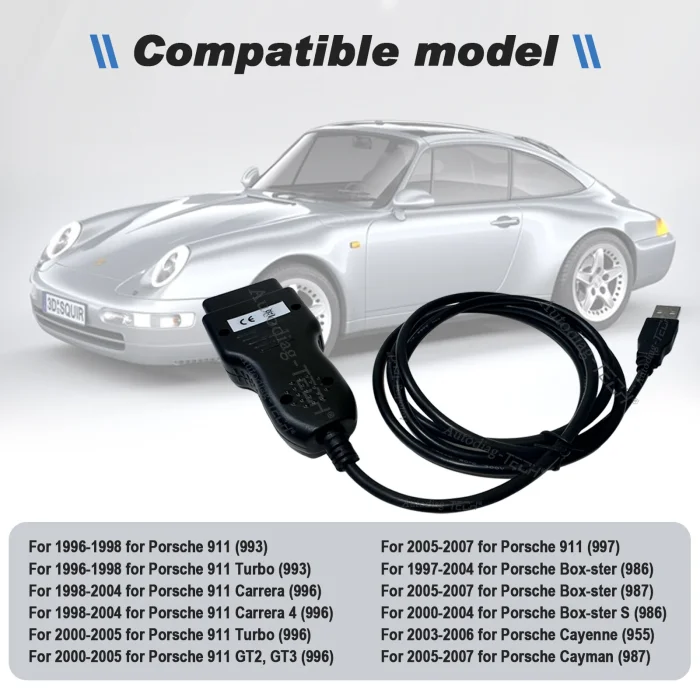
This diagnostic cable is suitable for selected Porsche models, including the 911, Boxster, Cayenne, and Cayman produced during the specified model years.
Important compatibility notice: This product supports Windows XP only and works with Durametric software. It does not support Porsche PIWIS software. Please verify your computer, software, and vehicle compatibility before purchasing.
Key Features of the Porsche OBD2 Diagnostic Cable
1. Vehicle System Diagnostics
The cable enables communication between a compatible Porsche vehicle and a Windows XP computer running Durametric software.
Access Diagnostic Information
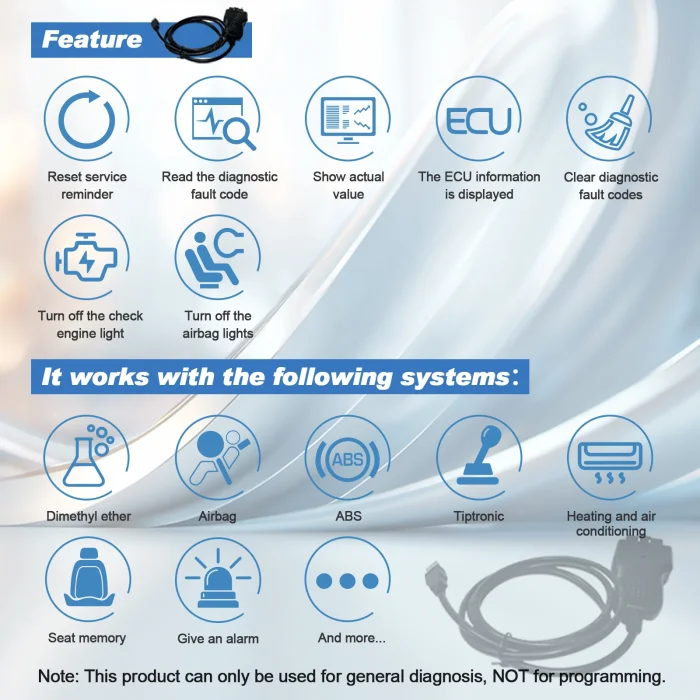
Depending on the supported vehicle and control unit, users can retrieve diagnostic trouble codes, review available actual values, and access ECU information. This helps technicians investigate potential vehicle problems and understand the status of supported electronic systems.
2. Read and Clear Diagnostic Trouble Codes
Fault codes provide useful information when diagnosing vehicle problems. This cable works with compatible Durametric software to read and clear supported diagnostic trouble codes.
Help Identify Potential Faults
Reading fault codes can help narrow down the possible causes of a warning light or vehicle malfunction. After the underlying problem has been repaired, supported fault codes may be cleared using the software.
Note: Clearing a fault code does not repair the underlying problem. Some faults may return if the original issue remains unresolved.
3. View Actual Values
Live or actual-value data can help technicians monitor available vehicle parameters while diagnosing a problem.
Support Practical Troubleshooting
The available data depends on the vehicle model, control unit, and software version. Reviewing actual values alongside fault codes can help users make more informed diagnostic decisions.
4. Reset Service Reminders
For supported Porsche models and systems, the diagnostic setup can reset service reminders after the required maintenance has been completed.
Maintenance Reminder Management
This function is useful for workshops and owners performing routine maintenance. Always complete the appropriate service procedure before resetting a maintenance reminder.
5. Display ECU Information
The cable and compatible software can display available electronic control unit information for supported vehicles.
Identify Supported Control Units
ECU information can help technicians understand which control units are communicating with the diagnostic software and assist with further troubleshooting.
6. Turn Off the Check Engine Light
After diagnosing and repairing an engine-related problem, users can clear supported diagnostic trouble codes and turn off the check engine light when the fault conditions permit.
Repair Before Clearing Codes
If the fault is still present, the warning light may return. Diagnose the cause first rather than relying on code clearing alone.
Compatible Porsche Models and Model Years
The Porsche Durametric OBD2 diagnostic cable is intended for the following vehicle applications. Compatibility depends on the specific model, control unit, software version, and vehicle configuration.
Porsche 911 Series
The cable is listed for these Porsche 911 models:
-
Porsche 911 (993): 1996–1998
-
Porsche 911 Turbo (993): 1996–1998
-
Porsche 911 Carrera (996): 1998–2004
-
Porsche 911 Carrera 4 (996): 1998–2004
-
Porsche 911 Turbo (996): 2000–2005
-
Porsche 911 GT2 / GT3 (996): 2000–2005
-
Porsche 911 (997): 2005–2007
Diagnostic Applications
For supported 911 models, the cable can be used with Durametric software to read fault codes, inspect available actual values, view ECU information, clear supported codes, and reset applicable service reminders.
Porsche Boxster Series
Compatible applications include:
-
Porsche Boxster (986): 1997–2004
-
Porsche Boxster S (986): 2000–2004
-
Porsche Boxster (987): 2005–2007
Useful for Routine Diagnostics
Owners and technicians can use the compatible diagnostic setup to investigate supported fault codes and review available vehicle data. Specific functions may vary by model year and control unit.
Porsche Cayenne
The listed application is:
-
Porsche Cayenne (955): 2003–2006
Vehicle Fault Diagnosis
For supported Cayenne configurations, the diagnostic cable can help users retrieve available fault codes and ECU information through Durametric software. Confirm the functions available for the exact vehicle before relying on it for a specific repair.
Porsche Cayman
The listed application is:
-
Porsche Cayman (987): 2005–2007
Diagnostic Support
Compatible Cayman vehicles can be connected to a Windows XP computer through the cable for supported diagnostic operations using Durametric software.
Compatibility reminder: The model list represents the stated applications for this product. It should not be interpreted as confirmation that every control unit or every diagnostic function is supported on every listed vehicle.
Important Software and Computer Requirements
Before purchasing the Porsche Durametric OBD2 cable, check the following requirements carefully.
Windows XP Is Required
This product is specified to support Windows XP only.
Check Your Operating System
A computer running Windows 7, Windows 10, or Windows 11 is outside the stated operating system compatibility. Do not assume that the cable will work on newer systems through compatibility mode or a virtual machine.
Durametric Software Only
The cable is designed to work with Durametric diagnostic software.
Not Compatible with Porsche PIWIS Software
Although both Durametric and PIWIS are associated with Porsche diagnostics, they are different diagnostic solutions. This product does not support PIWIS software.
If you specifically require a PIWIS-based diagnostic system, choose hardware designed for that software instead.
Confirm Software and Driver Availability
Before connecting the cable, ensure that you have access to a compatible Durametric software version and the necessary drivers for Windows XP.
Prepare the Diagnostic Computer
For the best chance of a successful connection:
-
Confirm that the computer runs Windows XP.
-
Install the compatible Durametric software and required drivers.
-
Connect the cable according to the supplied instructions.
-
Connect to the vehicle's diagnostic port.
-
Start the software and check communication with the supported control units.
Actual connection steps may vary depending on the cable version and software release.
Porsche Durametric Cable vs. Standard OBD2 Scanners
A standard OBD2 scanner is generally designed for emissions-related diagnostics, particularly engine fault codes and related data. A compatible Durametric setup can provide broader diagnostic access on supported Porsche vehicles.
Standard OBD2 Scanner
Typical functions may include:
-
Reading emissions-related engine fault codes
-
Clearing supported engine codes
-
Viewing selected engine data
-
Checking emissions readiness information
Main Limitation
Standard OBD2 functions cover only a subset of the diagnostic information available in a vehicle's electronic systems.
Porsche Durametric Diagnostic Cable
With compatible software and a supported vehicle, this cable offers:
-
Reading supported diagnostic trouble codes
-
Clearing supported diagnostic trouble codes
-
Viewing available actual values
-
Displaying ECU information
-
Resetting applicable service reminders
-
Clearing supported engine faults to turn off the check engine light
Choose According to Your Needs
This cable may be a practical option for users who already have a Windows XP computer and need Durametric-based diagnostics for the listed Porsche models. It is not the right choice for users who require PIWIS software or a diagnostic tool compatible with modern Windows operating systems.
How to Use the Porsche OBD2 Diagnostic Cable
Step 1: Check Vehicle Compatibility
Confirm the vehicle model, model year, and diagnostic requirements against the compatibility list.
Step 2: Prepare a Windows XP Computer
Use a computer running Windows XP and install the appropriate Durametric software and drivers.
Step 3: Connect the Diagnostic Cable
Connect the cable to the vehicle's diagnostic connector and the computer, following the product instructions.
Check the Connection
Ensure that the connectors are securely attached and that the vehicle has a stable electrical supply before starting diagnostic operations.
Step 4: Launch Durametric Software
Open the compatible software and establish communication with the vehicle.
Step 5: Perform the Required Diagnostic Function
Choose the available function, such as reading fault codes, checking actual values, viewing ECU information, or resetting an applicable service reminder.
Save Diagnostic Information
Where possible, record the original fault codes and relevant data before clearing codes. This can help with troubleshooting and subsequent repairs.
Frequently Asked Questions
Does This Porsche Diagnostic Cable Support PIWIS Software?
No. This product supports Durametric software only and does not support Porsche PIWIS software.
Which Windows Operating System Does It Support?
The product is specified for Windows XP only. Compatibility with Windows 7, Windows 10, Windows 11, or virtual machines is not confirmed.
Can It Read and Clear Porsche Fault Codes?
Yes. It can read and clear supported diagnostic trouble codes when used with compatible Durametric software on a supported vehicle.
Can It Access All Vehicle Systems?
The product description states that it can access vehicle systems beyond the limited emissions-related functions of standard OBD2. However, actual access depends on the vehicle model, control unit, and software version. Do not assume that every system or function is available on every vehicle.
Can It Reset Porsche Service Reminders?
Yes, for supported vehicles and service systems. Availability depends on the vehicle configuration and software support.
Does It Work with Porsche 911, Boxster, Cayenne, and Cayman?
It is listed for selected Porsche 911, Boxster, Cayenne, and Cayman models from the specified model years. Check the detailed compatibility list above and confirm your exact vehicle before ordering.
Can It Turn Off the Check Engine Light?
It can clear supported fault codes and turn off the check engine light when the fault conditions permit. If the underlying problem has not been repaired, the warning light may return.
Is This Cable Suitable for Newer Porsche Models?
The listed applications cover selected models from 1996 to 2007. Compatibility with newer Porsche models is not established by the supplied specifications.
Conclusion
The Porsche Durametric OBD2 Diagnostic Cable is designed for selected Porsche 911, Boxster, Cayenne, and Cayman models when used with compatible Durametric software on Windows XP. Its listed functions include reading and clearing diagnostic trouble codes, viewing actual values, displaying ECU information, resetting service reminders, and clearing supported engine faults.
Before purchasing, pay particular attention to the two main limitations: Windows XP is required, and PIWIS software is not supported. Confirming these requirements and your vehicle's compatibility will help you choose the right diagnostic cable for your Porsche maintenance and troubleshooting needs.
You May Also Like
-
 OBDII Car Diagnostic Tool For Wow Snooper 2022 ...US$ 37.31 US$ 41.45
 -
 Piwis 2 Piwis Tester II VCI Wifi with SSD Pors...US$ 485.10 US$ 539.00
 -
 WiFi V6154 ODiS V6.2 with PAD FZ-G1 Free Engine...US$ 44.46 US$ 49.40
 -
 New WIFI VAS5054A Red PCB V5054A Free HDD 0DlS ...US$ 54.00 US$ 60.00
 -
 PIWIS 3 PT3G Tester III Engineer Version V41.5 ...US$ 269.10 US$ 299.00
 -
 VA5054A Original OKI With Bluetooth Full Chip F...US$ 75.92 US$ 84.35
 -
 Newest VAS6154 diagnostic tool WIFI U disk with...US$ 103.50 US$ 115.00
 -
Recently Viewed
-
 Autel MaxiFlash VCI J2534 ECU Programmer OEM Pa...US$ 539.10 US$ 599.00
 -
 Caterpillar CAT ET 2026A Version Software Remot...US$ 79.20 US$ 88.00
 -
 Obd Diagnostic Cable Module S1279 Interface for...US$ 35.10 US$ 39.00
 -
 CAN Test Box OBD2 Breakout Box and Protocol Det...US$ 89.10 US$ 99.00
 -
 JLR Mangoose SDD V164 Auto Diagnostic ScabTool...US$ 62.91 US$ 69.90
 -
 Cummins Inpower Pro Diagnostic Scanner V14.5 In...US$ 719.10 US$ 799.00
 -
 ECU Probe Programming Bracke Solderless Solutio...US$ 62.10 US$ 69.00
 -
 AIKKEY K3 OBD Key Programmer Review: CAN FD Sup...US$ 170.10 US$ 189.00
- Company Info
- Feedback
- Customer Reviews
- About Us
- Contact Us
- News
- User Center
- Forget Password
- My Orders
- Tracking Order
- My Account
- Register
- Payment & Shipping
- Customs & Taxes
- Locations We Ship To
- Shipping Methods
- Payment Methods
- Company Policies
- Return Policy
- Privacy Policy
- Terms of Use
Customer Reviews