

|
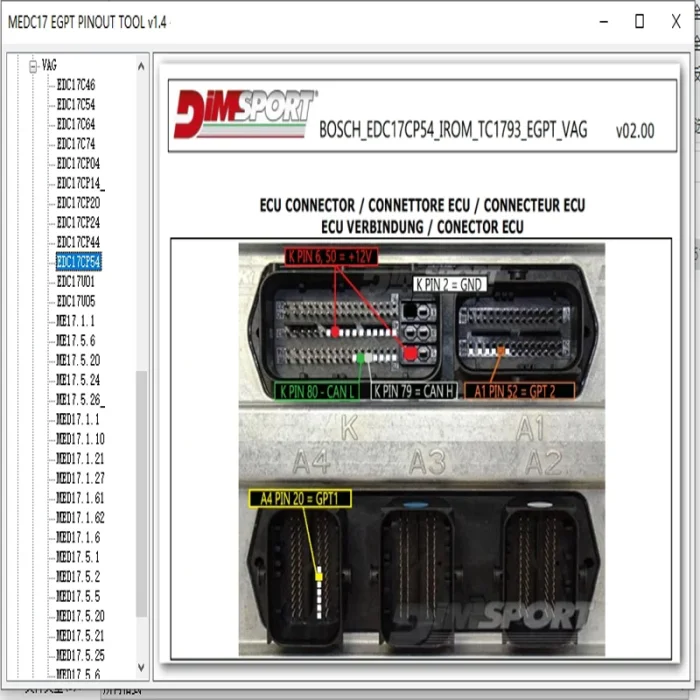
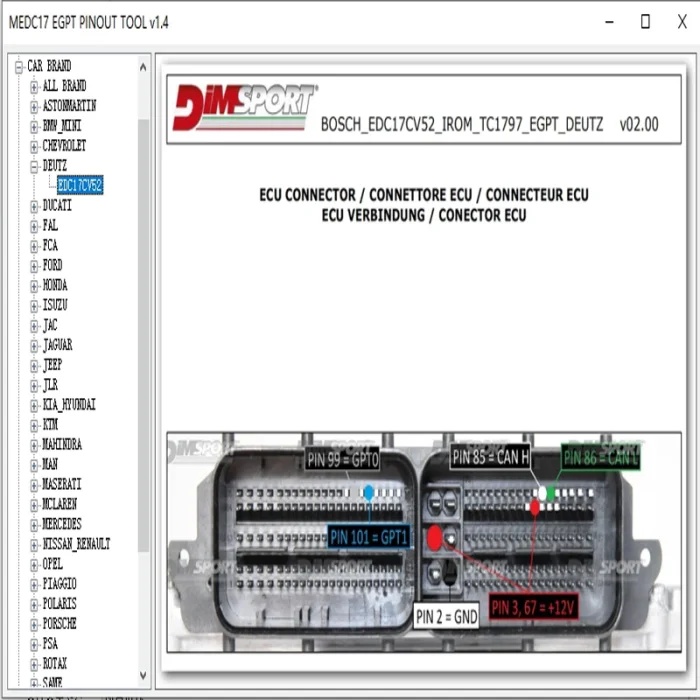

MEDC17 EGPT PINOUT TOOL v1.4 BOSCH ECU Pinout Wiring Diagram Software Guide


-
- Product Name: MEDC17 EGPT PINOUT TOOL v1.4 BOSCH ECU Pinout Wiring Diagram Software Guide
- Item NO.: 28750120
- Weight: 0 kg = 0.0000 lb = 0.0000 oz
- Category: ALL CATEGORIES > Diagnostic Software Update
- Creation Time: 2026-01-07
Notice:
This is a software. After purchasing, we will send you the download link via email. Alternatively, you can contact us directly via WhatsApp or our website, and we will provide you with the download link.
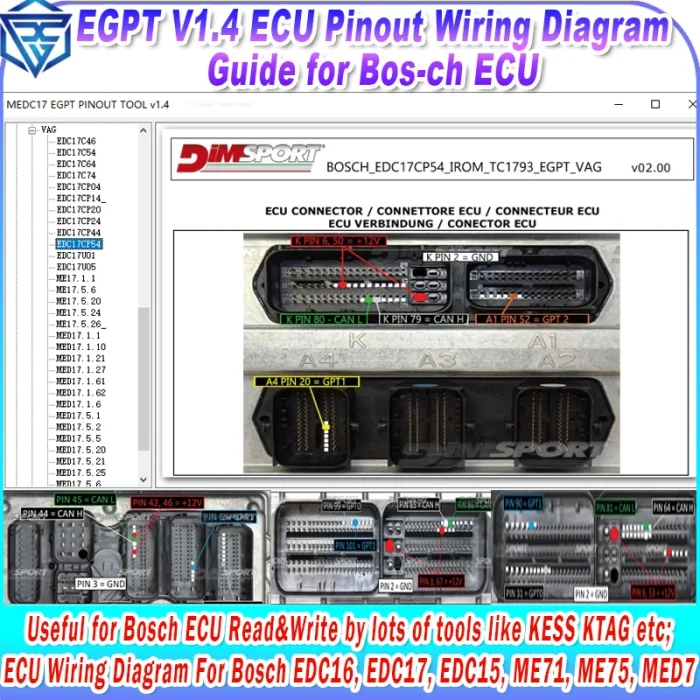
The MEDC17 EGPT Pinout Tool V1.4 is a professional ECU pinout software designed for automotive technicians, ECU repair specialists, and performance tuning enthusiasts. It provides accurate pinout diagrams, wiring information, and GPT/EGPT pin definitions for a wide range of BOSCH MEDC17 series ECUs, making it an essential solution for ECU programming, diagnostics, cloning, and repair.
By offering clear visual layouts and detailed connection tables, this software significantly reduces the risk of wiring errors and improves efficiency when working directly with ECU connectors or circuit boards.
What Is MEDC17 EGPT Pinout Tool V1.4?
The MEDC17 EGPT Pinout Tool V1.4 is a digital software utility focused on BOSCH MEDC17 ECU pin mapping, including EGPT (Enhanced General Purpose Timer) and GPT (General Purpose Timer) connections.
It helps users quickly identify:
-
Power and ground pins
-
CAN and K-LINE communication lines
-
BOOT and CNF pins
-
GPT0, GPT1, GPT2 timing pins
-
VPP programming voltage pins
This information is critical for bench mode programming, boot mode access, full ECU backup, and recovery operations.
Key Features of MEDC17 EGPT Pinout Tool V1.4
Comprehensive ECU Coverage
-
Supports a wide range of BOSCH MEDC17 ECUs
-
Includes EDC17, MEVD17, and motorcycle ECUs
-
Covers cars, trucks, and motorcycles from multiple brands
Visual Pinout Diagrams
-
High-clarity connector layouts
-
Clearly labeled pins with functional descriptions
-
Board-level BOOT pin references where applicable
GPT & EGPT Accuracy
-
Dedicated focus on GPT and EGPT pin assignments
-
Includes warning notes for swapped GPT numbering
-
Reduces common mistakes during ECU unlocking and flashing
Software Setup and Installation Guide
Software Delivery Method
The MEDC17 EGPT Pinout Tool V1.4 is delivered via digital download.
Installation Steps
-
Purchase Confirmation
After purchase, download links are sent via email. -
Download Files
Save all provided files to a secure folder on your computer. -
Extract & Install
Unzip the archive if compressed and run the executable file.
Follow on-screen installation instructions and accept the license agreement. -
Launch the Software
Open the tool from the desktop shortcut or Start Menu.
How to Use the MEDC17 EGPT Pinout Tool
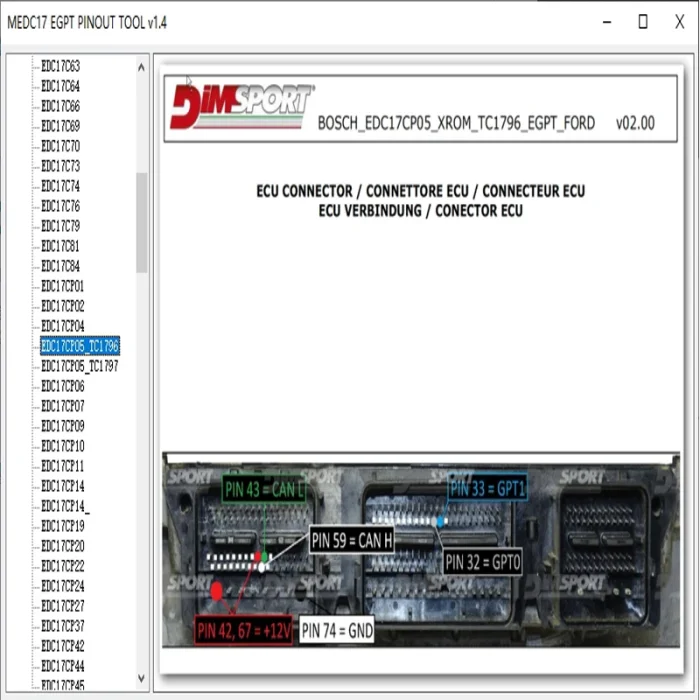
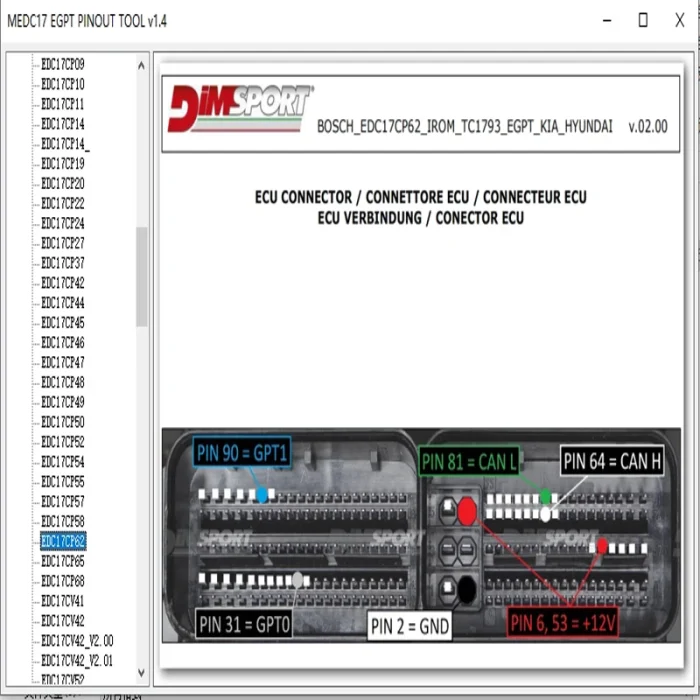
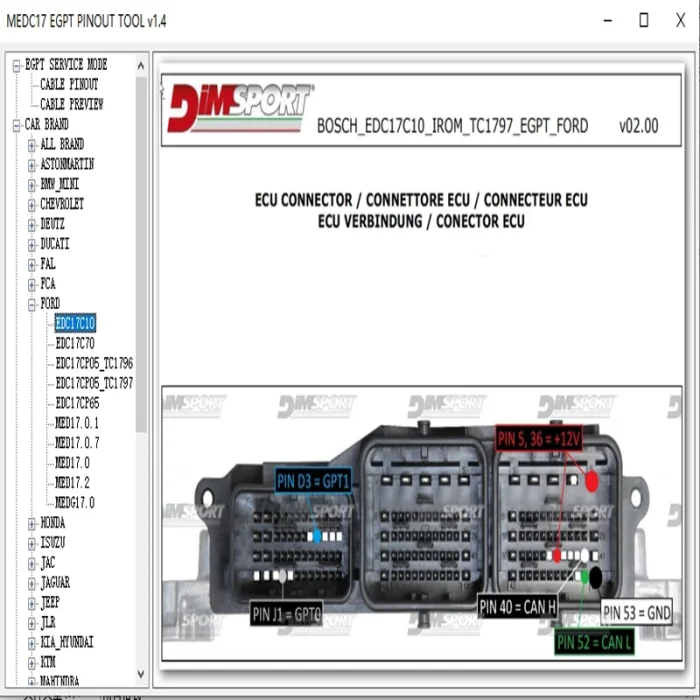
Interface Overview
The interface is designed for fast navigation and clarity:
-
Left Panel:
Hierarchical list of vehicle brands and ECU models -
Right Panel:
Detailed ECU connector diagrams and pin labels
Navigating ECU Models
-
Select the vehicle brand
-
Choose the ECU model (e.g., EDC17CV54, MEVD17.2.2)
-
View the corresponding pinout diagram instantly
Understanding ECU Pinout Diagrams
Each ECU diagram includes:
-
Power & Ground: 12V+, GND
-
Communication: CAN H, CAN L, K-LINE
-
Programming Pins: GPT0, GPT1, GPT2
-
Boot Mode Pins: BOOT, CNF1
-
Special Voltage: VPP
Always verify pin functions using the diagram legend and tables provided within the software.
Generic Cable Pinout Information
The software also includes generic cable pinout tables, useful for adapting common ECU programming cables.
Cable Type 1 Pinout
Color Function Red 12V+ Black GND White CAN H Green CAN L Yellow K-LINE Blue-Green GPT 1 Yellow-Red / Yellow-Brown GPT 2 Purple VPP Blue CNF 1 Grey BOOT
Cable Type 2 Pinout
Color Function Red 12V+ Black GND White CAN H Green CAN L Yellow-Black (Green insulation) K-LINE Yellow GPT 1 Orange GPT 2 Blue CNF 1 Grey BOOT Brown BOOT 2 ⚠ Important GPT Notice
ATTENTION:
GPT 1 = GPT 1
GPT 2 = GPT 0
GPT 0 = GPT 2Always confirm GPT assignments using the specific ECU diagram to avoid damage.
Supported ECU Examples
BOSCH EDC17CV54
-
IROM_TC1767_EGPT_ALLBRAND
-
Widely used in diesel vehicles
BOSCH MEVD17.2.2 (BMW)
-
IROM_TC1797_EGPT_BMW
-
Common in BMW petrol engines
BOSCH MEVD17.2.4.2 (BMW Motorrad)
-
IROM_TC1793_EGPT_BMW_MOTORRAD
-
Includes cable connection tables
EDC17C11 (Nissan / Opel / Renault)
-
Used in 2.0 M9R630 engines
-
Multi-brand coverage
Direct ECU Backup and Boot Mode Access
The software includes:
-
Direct ECU wiring diagrams
-
14P600KT02 cable examples
-
BOOT pin location references on ECU boards
These diagrams are essential for:
-
Full ECU backup
-
Recovery of bricked ECUs
-
Secure bench flashing
Technical Specifications
Product Details
-
Product Name: MEDC17 EGPT Pinout Tool
-
Version: V1.4
-
Brand: HGWU
-
Language: English
-
Delivery: Digital download
ECU Compatibility
-
BOSCH MEDC17 series
-
EGPT and GPT variants
-
Cars, trucks, motorcycles
Troubleshooting Common Issues
Software Not Launching
-
Run as administrator
-
Check OS compatibility
Missing ECU Diagrams
-
Ensure all files were installed correctly
-
Reinstall if necessary
Incorrect Pinout Display
-
Double-check ECU model selection
-
Cross-verify with physical ECU markings
Antivirus Warnings
-
Temporarily disable antivirus during installation
-
Re-enable after setup
Software Maintenance & Best Practices
Updates
Check with the seller periodically for:
-
New ECU models
-
Diagram corrections
Backup
Store a backup copy of the original download files safely.
Safety Tips
-
Always disconnect the vehicle battery before wiring
-
Work in a clean, organized environment
-
Never rely on a single source for critical ECU connections
Bonus Item: ECO OBD2 Fuel Optimization Device
What Is ECO OBD2?
The ECO OBD2 is a plug-and-play fuel economy tuning box included as a bonus item.
Key Benefits
-
Claims fuel savings of 8%–30%
-
Automatic calibration
-
No installation required
How to Use
Simply plug the ECO OBD2 device into your vehicle’s OBD2 port.
It adapts to your driving behavior and ECU parameters automatically.
You May Also Like
-
 2025.03 C4 Software For Mb Star C4 New SSD For ...US$ 89.10 US$ 99.00
 -
 TIS Techstream 18.00.008 software Activate Code...US$ 9.90 US$ 15.00
 -
 MEDC17 EGPT PINOUT TOOL v1.4 BOSCH ECU Pinout W...US$ 21.51 US$ 23.90
 -
 Newest Autocom 2021.11 and Delphi 2021.10b Hot ...US$ 10.20 US$ 12.00
 -
 2025 Consult 3 Ⅲ Plus V241 Diagnostic Software ...US$ 80.10 US$ 89.00
 -

-
-
 Newest Full Software Xentry Vediam/DTS /WIS EPC...US$ 89.10 US$ 99.00
Recently Viewed
-
 SAIC Diagnostic Tool SIPS Testing Equipment VDI...US$ 71.51 US$ 79.45
 -
 GODIAG GT113 Fuel Injector Tester & Fuel Inject...US$ 53.10 US$ 59.00
 -
 Latest HEX-NET Pro Diagnostic Tool with VCDS So...US$ 139.72 US$ 499.00
- Company Info
- Feedback
- Customer Reviews
- About Us
- Contact Us
- News
- User Center
- Forget Password
- My Orders
- Tracking Order
- My Account
- Register
- Payment & Shipping
- Customs & Taxes
- Locations We Ship To
- Shipping Methods
- Payment Methods
- Company Policies
- Return Policy
- Privacy Policy
- Terms of Use
Customer Reviews
2026-09-06