

|


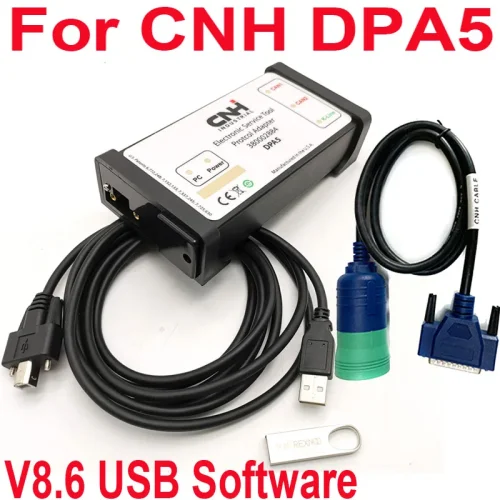
Dearborn Protocol Adapter5 Heavy Duty Truck Scanner DPA5 diagnostic tool DPA 5


-
- Product Name: Dearborn Protocol Adapter5 Heavy Duty Truck Scanner DPA5 diagnostic tool DPA 5
- Item NO.: 29409475
- Weight: 1.5 kg = 3.3069 lb = 52.9109 oz
- Category: Truck Diagnostic Tools > CNH New Holland Electronic
- Creation Time: 2026-08-26
What Is the Dearborn DPA5 Diagnostic Tool?
The Dearborn DPA5 is a PC-to-vehicle communication interface designed for heavy-duty truck and commercial vehicle diagnostics. It connects a Windows computer to a vehicle through the appropriate diagnostic cable, allowing compatible OEM diagnostic applications to communicate with vehicle control modules.
The DPA5 is aimed at technicians, repair shops, fleet maintenance teams, and users who work with different truck brands and electronic control systems.
Instead of using a separate communication interface for every manufacturer, the DPA5 can work with a wide range of heavy-duty diagnostic applications through supported communication standards such as RP1210A/B and J2534-2.
DPA5 Basic Specifications
Item Details Product Name Dearborn Protocol Adapter 5 Model DPA5-ED001 Manufacture Date 03/2026 Vehicle Voltage 12–24V Connection USB to PC Main Application Heavy-duty truck diagnostics Communication RP1210A/B, J2534-2 Main Protocols J1939, J1708/J1587, J1850, J2534, ISO 15765 Operating Systems Windows XP / Windows 7 Connection Method PC → USB → DPA5 → Vehicle Important: The product is specified for normal operation with 12–24V vehicle voltage.
How Does the DPA5 Work?
The basic operation is straightforward. The DPA5 acts as the communication bridge between the diagnostic software installed on a computer and the electronic control modules inside the truck.
DPA5 Connection Process
Step 1: Connect the DPA5 to a Computer
Connect the DPA5 to the Windows computer using the supplied USB cable.
Step 2: Connect the DPA5 to the Vehicle
Select the appropriate diagnostic cable for the vehicle and connect the DPA5 to the truck's diagnostic port.
Step 3: Open Diagnostic Software
Launch the compatible OEM diagnostic application on the computer and select the DPA5 as the communication interface when required.
Step 4: Start Vehicle Diagnostics
Once communication has been established, the software can be used for supported diagnostic functions such as reading fault information, viewing parameters, and communicating with electronic control modules.
DPA5 Supported Truck Diagnostic Applications
One of the main attractions of the DPA5 is its broad software compatibility. The supplied information lists support for several major heavy-duty vehicle and component diagnostic platforms.
Detroit Diesel Diagnostic Link
The DPA5 supports Detroit Diesel Diagnostic Link (DDDL) applications for compatible Detroit engines and systems.
Listed engine coverage includes DDEC VI-equipped engines and models such as:
- DD13
- DD15
- DD16
- Series 60
- MBE4000
- MBE900
- RS9 and RSX series
- RS10 and RSX10
This makes the DPA5 useful for workshops servicing Detroit-powered commercial vehicles.
Caterpillar Electronic Technician
The interface can also be used with Caterpillar Electronic Technician (CAT ET) for listed Caterpillar engine applications.
Supported examples include:
- 3126
- 3306B
- 3406
- 3512C
- C4.4
- C6.6
- C7
- C9
- C11
- C13
Compatibility can depend on the specific engine, software version, communication protocol, and vehicle configuration.
Cummins INSITE
Cummins is another major area of compatibility.
The supplied specification lists compatibility with Cummins INSITE, including versions such as INSITE 7.5 and INSITE 7.6, with Windows 7 noted for INSITE 7.6.
The listed engine and ECM families include various:
- ISB
- ISC
- ISL
- ISM
- ISX
- ISF
- ISBe
- ISDe
- QSB
- QSC
- QSK
- QSL
- QSX
- QST
Because Cummins engines use different ECM generations and communication configurations, users should verify the exact engine and software combination before purchasing.
Transmission and Brake System Support
The DPA5 is not limited to engine diagnostics. Its listed compatibility also covers transmission, ABS, brake, and other vehicle control systems.
Meritor WABCO
The supported applications include Meritor WABCO Toolbox versions and systems such as:
- HABS
- HPB
- ESC
- RSC
- ECAS
Bendix ACom Diagnostics
The DPA5 is also listed for Bendix ACom Diagnostics applications, including systems such as:
- EC-17T
- EC-30T
- EC-60T
- A-18T
- MC-30T
- TABS-6
These systems are commonly associated with commercial vehicle braking and trailer ABS applications.
Eaton ServiceRanger
The listed Eaton compatibility includes:
- AutoShift transmissions
- UltraShift transmissions
- UltraShift PLUS
- Lightning transmissions
- Hybrid drivetrain systems
Allison Diagnostic Applications
The DPA5 specification also lists Allison diagnostic software compatibility for various transmission families, including Allison 1000, 2000, 3000, and 4000 series.
Other listed systems include:
- CEC2-5610
- CEC2-6610
- CEC2-8610
- CEC2-9610
- CEC-MTB600
- CLBT-V
- HT700
- B700
- CEC-5
- CEC-6
- CEC-8
- CEC9000
DPA5 Communication Protocol Support
Communication protocol coverage is one of the most important specifications when choosing a heavy-duty diagnostic interface.
CAN and J1939
The DPA5 supports common heavy-duty vehicle CAN communication standards, including:
- CAN J1939
- CAN125
- CAN250
- CAN500
- CAN1000
- Second CAN channel
J1939 is especially important for commercial vehicles because it is widely used for communication between engine, transmission, braking, and other electronic control modules.
J1708 and J1587
The interface also supports J1708/J1587, which are commonly found in older heavy-duty trucks and electronic control systems.
This helps make the DPA5 useful for mixed fleets containing both newer and older vehicles.
Other Protocols
The listed protocol coverage also includes:
- J1850
- J2534
- ISO 15765
- ISO 14230
- KWP2000
- ISO9141
- ALDL
- ATEC 160
This broad protocol support allows the interface to work with different diagnostic applications and vehicle generations.
RP1210A/B and J2534-2 Support
RP1210A/B
RP1210 is an important standard for PC-based commercial vehicle diagnostic communication.
The DPA5 supports RP1210A/B, allowing compatible applications to communicate with vehicle networks through the adapter.
For professional truck repair shops, this can be particularly useful because many OEM and aftermarket diagnostic programs rely on RP1210-compatible communication devices.
J2534-2
The DPA5 also lists J2534-2 support.
J2534 is commonly associated with pass-through vehicle communication, allowing compatible manufacturer software to communicate with vehicle modules through a supported interface.
However, software compatibility should always be checked individually. Supporting a protocol does not automatically mean that every software version or vehicle function will work.
DPA5 Software Compatibility
The listed software interface capability includes a number of well-known heavy-duty diagnostic programs.
OEM Diagnostic Software
The supplied package information lists software interfaces including:
- Detroit Diesel Diagnostic Link 7.05
- Caterpillar Electronic Technician 2010B
- Cummins INSITE 7.5
- Cummins INSITE 7.6
- International ServiceMAXX Fleet Pro
- Volvo PTT 2.40
- VCADS / Elite
- Mack / Volvo applications
- V-MAC Service Tools
- Allison DOC
- Eaton ServiceRanger 3.2
- Bendix ACom
- ZF-Meritor TransSoft
- WABCO Toolbox
- International DLB
- International InTune
- International IPC
- Perkins EST Diagnostic Interface
Why Software Version Matters
Diagnostic compatibility depends on more than the name of the software.
The vehicle model, engine ECU, communication protocol, Windows version, adapter driver, and software release can all affect whether communication works correctly.
For this reason, users should confirm the exact application and vehicle combination before purchasing or installing the software.
DPA5 Cable and Accessory Kit
The supplied kit includes multiple cables designed for different vehicle and equipment connections.
Included Cables
The listed accessories include:
- DG-DPA5-Y Dual CAN cable
- DG-DPA5-9 OBD cable
- DG-DPA5-V-OLVO 8-pin cable
- DG-DPA5-14PIN cable
- DG-DPA5 Komatsu cable
- DG-DPA5-3Pin Deutsch cable
- DG-DPA5-15USB cable
The exact cable required depends on the diagnostic connector used by the vehicle or equipment.
Why Multiple Cables Are Useful
A heavy-duty repair shop may work on trucks, buses, construction equipment, engines, transmissions, and other commercial systems.
Having multiple diagnostic cables available means technicians can use the same communication interface with different connector configurations instead of purchasing a completely different interface for every application.
DPA5 Windows Compatibility
The supplied specifications list compatibility with:
- Windows XP
- Windows 7 32-bit
- Windows 7 64-bit
- Windows CE-compliant environments
Some diagnostic applications have their own operating system requirements. For example, the listed INSITE versions specify different Windows requirements.
What Should You Check Before Installation?
Before installing diagnostic software, check:
1. Operating System
Make sure the computer matches the requirements of the specific diagnostic application.
2. USB Driver
The computer needs to recognize the DPA5 correctly through USB.
3. Diagnostic Software
Confirm that the application supports the DPA5 and the required communication protocol.
4. Vehicle Connector
Choose the correct cable for the truck or equipment being diagnosed.
Who Should Consider the Dearborn DPA5?
The DPA5 is primarily aimed at users who need PC-based diagnostics for heavy-duty vehicles.
Professional Truck Repair Shops
Repair shops servicing multiple truck brands can benefit from an interface supporting different diagnostic platforms.
Fleet Maintenance Departments
Fleet technicians may work with several engine, transmission, ABS, and vehicle systems. A multi-protocol interface can simplify the diagnostic setup.
Diesel Technicians
Technicians working with Detroit Diesel, Cummins, Caterpillar, International, Volvo, Mack, Allison, Eaton, Bendix, and related systems may find the broad application support useful.
Construction and Industrial Equipment Technicians
Because the listed coverage includes Caterpillar and Komatsu-related connections, the DPA5 may also be useful for certain off-highway equipment applications.
Advantages of the DPA5
Wide Protocol Coverage
Support for J1939, J1708/J1587, J1850, J2534, ISO 15765, and other protocols makes the interface versatile.
Multi-Brand Compatibility
The DPA5 is designed to work with diagnostic applications covering multiple manufacturers and component suppliers.
Multiple Cable Options
The included cable selection makes it easier to connect to different heavy-duty diagnostic ports.
PC-Based Diagnostics
Technicians can use a Windows computer and compatible diagnostic applications rather than relying exclusively on a dedicated handheld scanner.
Useful for Mixed Fleets
For workshops servicing different truck brands, broad application compatibility can be more convenient than using a single-brand interface.
Important Compatibility Notes
The DPA5 specification states that not all applications are included. Compatibility should therefore be confirmed before purchasing if a specific vehicle, application, or diagnostic function is required.
A supported communication protocol also does not guarantee every diagnostic function.
For example, basic communication, fault-code reading, advanced diagnostics, parameter programming, and module configuration can have different software and hardware requirements.
Check These Items Before Buying
Vehicle
Confirm the exact truck, engine, transmission, ABS system, and model year.
Software
Confirm the exact diagnostic software and version required.
Operating System
Check whether the software requires Windows XP, Windows 7, or another environment.
Cable
Make sure the required diagnostic connector is included in the kit.
Function
Verify whether you need basic diagnostics or advanced functions such as configuration, programming, or parameter changes.
Frequently Asked Questions
What is the DPA5 used for?
The Dearborn DPA5 is a PC-to-vehicle communication adapter used with compatible heavy-duty truck diagnostic applications.
Does the DPA5 support 12V and 24V vehicles?
The supplied product information specifies normal operation with 12–24V vehicle voltage.
Does DPA5 support Cummins INSITE?
Yes. The listed compatibility includes Cummins INSITE 7.5 and 7.6, with specific Windows requirements.
Can DPA5 work with Detroit Diesel engines?
Yes. The supplied compatibility list includes Detroit Diesel Diagnostic Link and multiple Detroit engine families.
Does DPA5 support Caterpillar?
The listed software compatibility includes Caterpillar Electronic Technician for supported Caterpillar applications.
Does DPA5 support Allison transmissions?
Yes. The specifications list Allison DOC applications and multiple Allison transmission families.
Is DPA5 a standalone scanner?
No. The DPA5 is primarily a communication interface used with a computer and compatible diagnostic software. The actual diagnostic functions depend on the software being used.
Does DPA5 support RP1210?
Yes. RP1210A/B is listed among its supported API standards.
Final Thoughts
The Dearborn DPA5 Heavy Duty Truck Diagnostic Tool is designed as a versatile communication interface for PC-based commercial vehicle diagnostics. Its biggest selling point is not a single diagnostic function but its combination of multi-brand software compatibility, broad protocol coverage, RP1210/J2534 support, and multiple heavy-duty vehicle cables.
For technicians working with Detroit Diesel, Cummins, Caterpillar, International, Volvo, Mack, Allison, Eaton, Bendix, WABCO, and other supported systems, the DPA5 can provide a flexible communication solution.
The most important thing to remember is that compatibility should always be checked against the exact vehicle, ECU, diagnostic software version, Windows environment, and required function. When those requirements match, the DPA5 can be a practical addition to a professional heavy-duty diagnostic setup.
You May Also Like
-
 CNH EST V9.5 New Holland Electronic Service Too...US$ 180.00 US$ 200.00
 -
 CNH DPA5 Diagnostic Kit Heavy Duty Truck Scanne...US$ 171.00 US$ 190.00
Recently Viewed
-
 VXDIAG VCX SE DoIP Porsche PIWIS 2 PIWIS 3 Diag...US$ 503.10 US$ 559.00
 -
 Newest FC200 DB15 Harness Adapter CGDI CG 16 PI...US$ 197.10 US$ 219.00
 -
 Autel MaxiFlash VCI J2534 ECU Programmer OEM Pa...US$ 539.10 US$ 599.00
 -
 Caterpillar CAT ET 2026A Version Software Remot...US$ 79.20 US$ 88.00
 -
 Obd Diagnostic Cable Module S1279 Interface for...US$ 35.10 US$ 39.00
 -
 CAN Test Box OBD2 Breakout Box and Protocol Det...US$ 89.10 US$ 99.00
 -
 JLR Mangoose SDD V164 Auto Diagnostic ScabTool...US$ 62.91 US$ 69.90
 -
 Cummins Inpower Pro Diagnostic Scanner V14.5 In...US$ 719.10 US$ 799.00
- Company Info
- Feedback
- Customer Reviews
- About Us
- Contact Us
- News
- User Center
- Forget Password
- My Orders
- Tracking Order
- My Account
- Register
- Payment & Shipping
- Customs & Taxes
- Locations We Ship To
- Shipping Methods
- Payment Methods
- Company Policies
- Return Policy
- Privacy Policy
- Terms of Use
Customer Reviews