

|


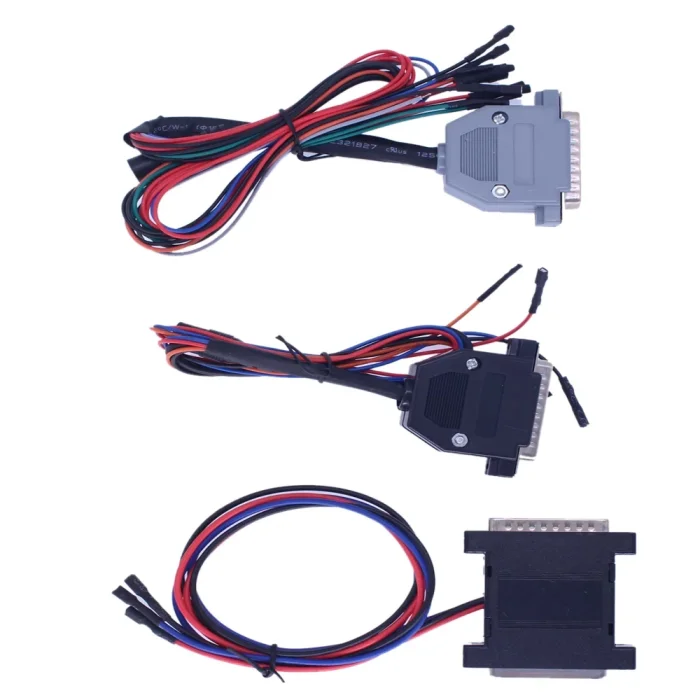


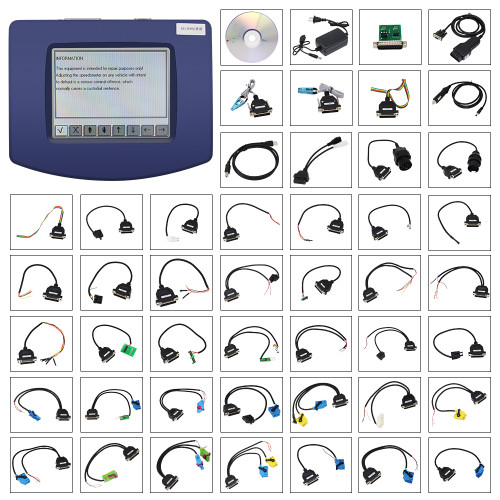
FVDI 2014 Commander for Volvo Benz Renault Cars CAN Bus Multi-Brand Automotive Diagnostic and Programming Tool


-
- Product Name: FVDI 2014 Commander for Volvo Benz Renault Cars CAN Bus Multi-Brand Automotive Diagnostic and Programming Tool
- Item NO.: 29461306
- Weight: 1 kg = 2.2046 lb = 35.2740 oz
- Category: ECU-Chip-Tuning
- Creation Time: 2026-09-03
When you need one automotive diagnostic tool to cover multiple vehicle brands, having separate devices and software for every manufacturer can quickly become expensive and inconvenient. FVDI 2014 is designed as a multi-brand solution that combines vehicle diagnostics, key programming, ECU programming, mileage-related functions and other service operations in one platform.
The FVDI Commander 2014 version includes 18 activated software modules, covering brands such as Volkswagen, Audi, Mercedes-Benz, BMW, Porsche, Ford, Toyota, Renault, Peugeot, Citroen, Fiat, Hyundai/Kia, Nissan, Volvo and more.
Another major advantage of this version is its offline operation. According to the provided product information, the 18 software modules are activated and can be used without a subscription or online login.
What Is FVDI 2014?
FVDI 2014 is a multi-brand automotive diagnostic and programming solution developed for professional automotive technicians, locksmiths and repair workshops.
Unlike a basic OBD scanner that mainly reads and clears diagnostic trouble codes, FVDI Commander combines several service functions into a single platform.
FVDI Commander Main Functions
The FVDI 2014 system can be used for:
- Vehicle diagnostics
- PIN code reading via OBDII
- Key programming
- Dealer key preparation
- Mileage recalibration
- Crash data and DTC clearing
- ECU flash memory reading and programming
- Coding and adaptation
- KESSY and ELV synchronization
- MMI-TV speed-limit related functions
A Multi-Function Automotive Tool
This combination makes FVDI 2014 more than a conventional diagnostic scanner. Depending on the vehicle brand and supported control module, it can provide diagnostic, immobilizer, key programming and ECU-related service functions.
FVDI 2014 Software and Brand Coverage
One of the most important features of FVDI 2014 is its broad brand coverage.
The package contains 18 software modules, each designed for a specific vehicle manufacturer or vehicle group.
European Vehicle Coverage
FVDI 2014 supports many popular European brands, including:
VAG: Volkswagen, Audi, SEAT and Skoda
The VAG software is listed as V21.0 and provides diagnostic and programming functions for Volkswagen Group vehicles.
Mercedes-Benz, Smart and Maybach
The Mercedes/Smart/Maybach software is listed as V6.4, offering brand-specific diagnostic and programming functions.
BMW
The BMW software version is listed as V10.3.
Porsche
The Porsche module is listed as V4.1.
Opel and Vauxhall
The Opel/Vauxhall module is listed as V6.2.
Peugeot and Citroen
The PSA software is listed as V6.3.
Fiat, Alfa Romeo and Lancia
The Fiat/Alfa/Lancia module is listed as V5.4.
Renault
The Renault software is listed as V5.4.
Asian Vehicle Coverage
FVDI 2014 also covers a range of Asian manufacturers.
Toyota and Lexus
The Toyota/Lexus software is listed as V6.0.
Hyundai and Kia
The Hyundai/Kia module is listed as V2.1.
Nissan and Infiniti
The Nissan/Infiniti software is listed as V4.3.
Mitsubishi
The Mitsubishi module is listed as V2.1.
Other Supported Brands
The software package also includes:
- Ford V4.9
- Chrysler/Dodge/Jeep V3.1
- Volvo V4.3
- DAF V1.0
- Bikes, Snowmobiles and Water Scooters V1.2
- TAG Key Tool V6.0
Key Programming with FVDI 2014
For automotive locksmiths and workshops, key programming is one of the most useful areas of the FVDI Commander system.
PIN Code Reading
On supported vehicles, FVDI can read immobilizer-related PIN codes through the OBDII diagnostic connection.
This can help technicians perform subsequent key programming procedures when the vehicle and software version support the required operation.
Key Programming
FVDI 2014 supports key programming through OBDII for compatible vehicles.
Dealer Key Preparation
The system also supports the preparation of dealer keys for selected vehicle platforms.
Because key programming procedures vary significantly between manufacturers and vehicle generations, the actual functions available depend on the specific model, ECU/immobilizer system and software version.
ECU Programming and Flash Memory Functions
Another important feature of FVDI 2014 is its ECU programming capability.
Reading ECU Flash Memory
On supported engine control units, the software can communicate through OBDII to read flash memory.
ECU Flash Programming
FVDI Commander can also program ECU flash memory on compatible vehicles.
Flash Attempt Reset
The provided specifications also mention options for resetting the number of flashing attempts on supported ECUs.
These functions should always be performed carefully because an interrupted or incorrect programming procedure may affect ECU operation.
Mileage Correction and Diagnostic Functions
FVDI 2014 combines diagnostic functions with mileage-related service functions.
Mileage Recalibration
The system supports mileage recalibration via OBDII on selected vehicles.
Availability depends on the vehicle model, instrument cluster and software support.
DTC and Crash Data Functions
The FVDI software can also provide functions for clearing diagnostic trouble codes and, on supported systems, clearing crash-related data.
Diagnostic Scanner Functions
As a diagnostic scanner, FVDI can communicate with supported vehicle control systems and assist technicians in identifying electronic faults.
Coding, Adaptation and Synchronization
Modern vehicles often require more than simply reading fault codes. FVDI 2014 also includes several coding and adaptation functions.
Coding Calculator
The software provides a coding calculator supporting both:
- Short coding
- Long coding
This can be useful when configuring supported electronic control modules.
KESSY and ELV Synchronization
For compatible systems, FVDI 2014 supports synchronization and adaptation functions for KESSY and ELV systems.
These functions can be particularly relevant when servicing vehicle access, steering-lock and immobilizer-related components.
FVDI 2014 Operating System Requirements
Before installing the software, it is important to check whether the computer meets the specified requirements.
Supported Windows Systems
According to the supplied specifications, FVDI 2014 supports:
Windows XP
- Windows XP SP2 Professional 32-bit
- Windows XP SP2 Professional 64-bit
- Windows XP SP3 Professional 32-bit
- Windows XP SP3 Professional 64-bit
Windows 7
- Windows 7 Ultimate 32-bit
- Windows 7 Ultimate 64-bit
Windows 10
- Windows 10 Professional 64-bit
Installation Requirements
For a smoother installation process, the supplied instructions recommend:
- Log in to Windows with Administrator privileges.
- Disable antivirus software before downloading and installing the FVDI software.
- Disable the Windows firewall during installation if required.
- Do not use VMware virtual machines.
Remote Installation Support
If the user has difficulty installing the software, the provided instructions recommend using TeamViewer and contacting the seller or technician for remote installation assistance.
FVDI 2014 Multi-Language Support
FVDI Commander supports multiple languages depending on the software module.
Major Language Options
The VAG module supports languages including English, German, Spanish, French, Russian, Italian, Danish, Czech, Chinese and Bulgarian.
The Mercedes-Benz module supports English, German, Spanish, French, Italian, Danish, Romanian, Czech and Bulgarian.
Other modules provide different language combinations.
Extensive Language Coverage
Ford and Volvo modules, for example, support a particularly wide range of languages, including English, German, French, Italian, Spanish, Dutch, Swedish, Finnish, Danish, Norwegian, Portuguese, Greek, Turkish, Hungarian, Czech, Slovenian, Polish, Russian, Chinese, Japanese, Thai and Romanian.
Language availability varies by software module, so users should check the specific brand software before installation.
Why Choose FVDI Commander 2014?
There are several reasons why FVDI 2014 can be attractive to automotive professionals.
18 Software Modules in One Package
Instead of purchasing individual software packages for every manufacturer, the FVDI 2014 package brings 18 brand-specific modules together.
Offline Operation
The supplied version is described as an offline version with the included software modules activated, allowing users to operate without relying on a continuous online subscription.
Multiple Automotive Functions
FVDI combines several functions in one platform, including:
- Diagnostics
- Key programming
- PIN code reading
- Mileage-related functions
- ECU programming
- Coding
- Adaptation
- Synchronization
Wide Vehicle Coverage
From VAG and Mercedes-Benz to Toyota, Ford, Renault and Volvo, the software covers a broad selection of passenger vehicles and commercial applications.
FVDI 2014 Frequently Asked Questions
Is FVDI 2014 an offline tool?
Yes. The supplied product description identifies this version as an offline version, with all 18 software modules activated.
How many software modules are included?
FVDI 2014 includes 18 software modules, covering multiple European, Asian and other vehicle brands.
What vehicles does FVDI 2014 support?
It supports brands including Volkswagen, Audi, SEAT, Skoda, Mercedes-Benz, Smart, Maybach, BMW, Porsche, Opel/Vauxhall, Peugeot, Citroen, Fiat, Alfa Romeo, Lancia, Renault, Toyota, Lexus, Hyundai, Kia, Nissan, Infiniti, Ford, Chrysler, Dodge, Jeep, Volvo, Mitsubishi and DAF, plus selected motorcycles, snowmobiles and water scooters.
Can FVDI 2014 program keys?
Yes, key programming and dealer-key preparation are among the listed functions for supported vehicles.
Can FVDI 2014 program ECUs?
Yes. The system supports reading and programming ECU flash memory through OBDII on compatible control units.
Does FVDI 2014 support Windows 10?
Yes. The supplied specifications list Windows 10 Professional 64-bit as a supported operating system.
Can FVDI 2014 run inside VMware?
No. The supplied installation instructions specifically state that VMware should not be used.
Conclusion
FVDI 2014 is a multi-brand automotive diagnostic and programming solution that brings diagnostic scanning, key programming, PIN code reading, mileage-related functions, ECU programming, coding and synchronization into one platform.
Its biggest selling points are the 18 activated software modules, broad vehicle coverage and offline operation. For automotive repair shops, technicians and locksmith professionals working with multiple brands, FVDI Commander 2014 can provide a convenient all-in-one platform for a wide range of supported vehicle service tasks.
Before using any programming or immobilizer function, however, it is important to verify the exact vehicle model, year, ECU/immobilizer system and supported software version, because available functions can vary between vehicles.
You May Also Like
-
 OBDSTAR MP001 Programmer with ECU Bench Jumper ...US$ 215.10 US$ 239.00
 -
-
 Xhorse Multi Prog Programmer The ECU Chip Tunin...US$ 899.10 US$ 999.00
 -
 Original Yanhua Digimaster 3 Odometer Correctio...US$ 1519.20 US$ 1899.00
 -
 2024 Piasini V4.3 Engineering Firmware OBD2 Mas...US$ 34.74 US$ 38.60
 -
 KTM JTAG PowerBox for Hitachi PCMflash ECU Tuni...US$ 35.10 US$ 39.00
 -
-
 Digiprog 3 V4.94 Vehicle Odometer Mileage Corre...US$ 116.10 US$ 129.00
Recently Viewed
-
 IFlash Obd Programmer FULL Version ECU BCM BSI ...US$ 476.10 US$ 529.00
 -
 Obd Diagnostic Cable Module S1279 Interface for...US$ 35.10 US$ 39.00
 -
 CAN Test Box OBD2 Breakout Box and Protocol Det...US$ 89.10 US$ 99.00
 -
 JLR Mangoose SDD V164 Auto Diagnostic ScabTool...US$ 62.91 US$ 69.90
 -
 Cummins Inpower Pro Diagnostic Scanner V14.5 In...US$ 719.10 US$ 799.00
 -
 ECU Probe Programming Bracke Solderless Solutio...US$ 62.10 US$ 69.00
 -
 AIKKEY K3 OBD Key Programmer Review: CAN FD Sup...US$ 170.10 US$ 189.00
- Company Info
- Feedback
- Customer Reviews
- About Us
- Contact Us
- News
- User Center
- Forget Password
- My Orders
- Tracking Order
- My Account
- Register
- Payment & Shipping
- Customs & Taxes
- Locations We Ship To
- Shipping Methods
- Payment Methods
- Company Policies
- Return Policy
- Privacy Policy
- Terms of Use
Customer Reviews