

|


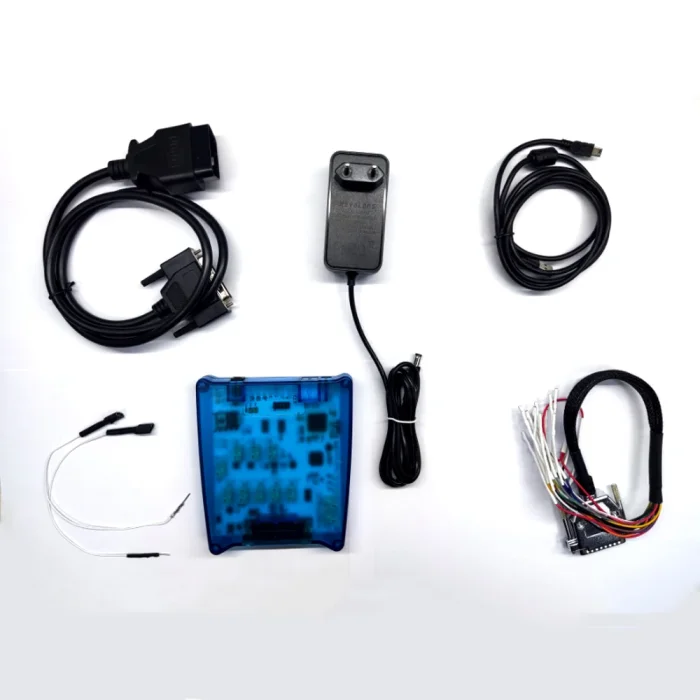


IFlash Obd Programmer FULL Version ECU BCM BSI Tool OBD2 Immobilizer Pincode Read ECU Transformation


-
- Product Name: IFlash Obd Programmer FULL Version ECU BCM BSI Tool OBD2 Immobilizer Pincode Read ECU Transformation
- Item NO.: 29426415
- Weight: 1 kg = 2.2046 lb = 35.2740 oz
- Category: ECU-Chip-Tuning
- Creation Time: 2026-08-27
What Is the ECUHELP IFlash OBD Programmer?
The ECUHELP IFlash OBD Programmer is a multifunctional automotive programming and diagnostic tool designed for working with selected engine control units, body computers, BSI modules, immobilizer systems, and related electronic modules.
Instead of focusing only on basic fault-code reading, IFlash is designed around module-related operations such as ECU cloning, immobilizer-related functions, PIN code reading, ECU adaptation, blocked-key management, odometer-related operations, and advanced cloning.
The tool supports a range of European vehicle electronics, including systems from Alfa Romeo, Citroen, Fiat, IVECO, Opel, Ford, Ferrari, Maserati, and Smart, depending on the supported ECU or body module.
Note: Vehicle and ECU coverage depends on the exact hardware version, software version, ECU hardware number, and supported protocol. Always verify compatibility before performing programming operations.
ECUHELP IFlash OBD Programmer System Requirements
Before installing the IFlash software, make sure the computer meets the basic requirements.
Operating System Requirements
IFlash requires:
- Windows 10 64-bit
- Windows 11 64-bit
Older Windows versions should not be assumed to be compatible with the current software package.
Hardware Requirements
The supplied requirements include:
- RAM: Minimum 2 GB
- USB ports: At least two USB 2.0 or USB 3.0 ports
- Storage: The installation computer must have at least two drives
Why Are Two Drives Required?
The installation instructions specifically require the computer to have at least two drives. Therefore, users should check their computer's storage configuration before beginning installation.
This is particularly important for workshop computers that may have been configured with a single storage partition.
Important IFlash Software Installation Notes
Software installation should be completed carefully because the installation package may need to download additional software components.
Temporarily Disable Antivirus and Firewall
According to the supplied installation instructions, antivirus software and the firewall should be disabled during installation so the software can download and install correctly.
After installation is complete, users should restore their normal security settings and only create necessary exceptions if required by the software.
Check the Computer Before Installation
Before starting the installation, verify:
- Windows 10 64-bit or Windows 11 64-bit is installed.
- The computer has at least 2 GB RAM.
- Two USB ports are available.
- The computer contains at least two drives.
- The required software package and drivers are ready.
- A stable USB connection is available.
Main Functions of ECUHELP IFlash
The IFlash platform combines several functions for supported ECU and body-control applications.
ECU Cloning
ECU cloning is one of the main functions associated with IFlash.
When the specific ECU and software version are supported, cloning can help transfer relevant data from one module to another compatible module.
Advanced Cloning
The advanced cloning function provides additional capabilities for supported control units and can be useful when standard cloning procedures are insufficient.
Because ECU data structures vary considerably, users should always confirm the exact hardware and software compatibility before writing data to a replacement module.
PIN Code Reading
IFlash supports PIN code reading for selected vehicle systems.
PIN information can be relevant to immobilizer and key-related procedures, but availability depends on the vehicle, ECU, BCM, BSI, or other supported module.
Immobilizer Functions
The programmer also provides immobilizer-related functions for compatible systems.
These functions can be useful during module replacement, adaptation, and other authorized immobilizer service procedures.
Odometer Functions
IFlash includes odometer-related functionality for supported systems.
Because mileage data is sensitive vehicle information, such operations should only be performed for legitimate repair, replacement, calibration, or documentation purposes and in accordance with applicable laws.
ECU Transformation and Adaptation
The tool supports ECU transformation and adaptation on selected systems.
This can be useful when installing or replacing an ECU and ensuring that the module is properly adapted to the vehicle's electronic configuration.
Blocked Key Management
For supported immobilizer systems, IFlash can provide management functions for blocked keys.
The exact operation depends on the vehicle and immobilizer architecture.
EGR Function for MJD6xx
The supplied compatibility information lists an EGR function for MJD6xx engine management systems.
This feature is limited to supported ECU variants and should not be interpreted as universal EGR support.
Body Reading for Transponder Coding
IFlash can read supported body-module information for transponder coding applications.
This makes the tool useful for certain vehicle key and immobilizer service workflows.
Supported Protocols and Module Families
The ECUHELP IFlash supports several European automotive electronic platforms.
FCA Body Computer
The programmer supports selected FCA Body Computer systems.
These applications cover various Fiat and related FCA platforms.
PSA BSI
IFlash supports selected PSA Body System Integration (BSI) modules.
The supplied compatibility list includes BSI systems manufactured by Siemens, Valeo, and Johnson Controls.
IVECO Body Computer
Selected IVECO LCV Body Computer applications are included in the supported protocols.
Marelli ECU Families
The compatibility information includes several Marelli ECU families, including:
- 59F
- 5AF
- 4AF
- 5SFx
- 9GF
- 8GSx
- MJD6xx
- MJD8xx
- MJD8DS
- 8F2
- 8F3
- 9DF
Delphi Body Modules
Selected Delphi body-control applications are supported for vehicles including Opel and Ford applications.
Ferrari and Maserati Body Systems
The supplied protocol list also includes body-system support for selected Ferrari and Maserati applications.
Smart SAM
IFlash includes support for selected Smart Signal Acquisition Module (SAM) applications.
FCA Blue&Me
The software also lists Blue&Me FCA Check Test support as a new function.
ECUHELP IFlash Alfa Romeo Coverage
The supplied compatibility list includes several Alfa Romeo platforms.
Alfa Romeo 147 937
For the Alfa Romeo 147 937, IFlash supports selected Marelli NBC Body Computer variants, including:
Supported Marelli NBC Versions
- NBC937.01
- NBC937.02
- NBC937.72
- NBC937.76
- NBC937.92
- NBC937.96
Alfa Romeo 159 939
The Alfa Romeo 159 939 is listed with Marelli NBC body-computer coverage.
Supported NBC Versions
- NBC939.71
- NBC939.91
The list also includes selected Blue&Me 1st and 2nd generation convergence systems.
Alfa Romeo Giulietta 940
For the Giulietta 940, the supplied data lists Marelli BCM support.
Supported Marelli BCM Versions
- BCM940D.01
- BCM9401.07
- BCM9401.11
- BCM9401.21
Blue&Me 1st and 2nd generation convergence systems are also listed.
Alfa Romeo MiTo 955
The MiTo 955 compatibility list contains several Delphi body computers and Marelli engine-management systems.
Delphi FI2 Gray Plug
Listed Delphi references include:
- 28177152
- 28187862
- 28204307
- 28220375
- 28323893
Delphi FI4 Blue Plug
Listed references include:
- 28400586
- 28417879
- 28459400
Marelli 6F3
Selected Marelli 6F3 ECUs include:
- 6F3.J1 HW04P3643J191
- 6F3.J1 HW04P3646J198
- 6F3.J2 HW04P3645J296
Marelli 8F2 and 8F3
The compatibility list also contains multiple Marelli 8F2 and 8F3 hardware configurations.
ECUHELP IFlash Citroen Compatibility
The supplied coverage includes selected Citroen C3 Mk1 applications.
Citroen C3 Mk1
For the C3 Mk1, the listed BSI systems include:
Siemens BSI
- BSI-F01-00
- BSI-F02-00
Valeo BSI2004
- P06-00
- P09-00
- P10-00
Johnson Controls BSI
- BSI04EV-K01-00
- BSI04EV-K04-00
- BSI2004-H05-01
Citroen Marelli Engine ECUs
The supplied compatibility list includes selected Marelli 8F2, 8F3, and 9DF engine-management systems.
Examples include:
- Marelli 8F2.F1
- Marelli 8F2.F4
- Marelli 8F2.F5
- Marelli 8F3.F2
- Marelli 8F3.F6
- Marelli 8F3.Q1
- Marelli 8F3.QB
- Marelli 8F3.QD
- Marelli 9DF.F4
- Marelli 9DF.F5
- Marelli 9DF.FE
- Marelli 9DF.FF
ECUHELP IFlash Fiat Compatibility
Fiat is one of the major vehicle groups represented in the supplied compatibility list.
Fiat 500 312
For the Fiat 500 312, IFlash supports selected Delphi body computers.
Delphi FI2 Gray Plug
The supplied list includes multiple Delphi references, such as:
- 28097429
- 28143018
- 28169539
- 28210051
- 28210453
- 28233876
- 28273324
- 28298729
- 28330969
- 28354596
- 28354614
- 28425143
- 28451066
- 28451082
- 28479339
Delphi FI4 Blue Plug
Selected references include:
- 28350477
- 28429212
- 28286877
- 28461815
- 28470200
- 28504012
- 28524573
Fiat 500 Marelli 5SF9
The compatibility list includes several Marelli 5SF9.MS engine-management versions, including different hardware configurations.
Fiat 500 Marelli 8F3
Selected 8F3.C1 and 8F3.C3 configurations are also listed.
Fiat 500 Marelli 9GF
The supplied data includes multiple Marelli 9GF.DG, 9GF.T6, 9GF.T9, and 9GF.TN configurations.
This is important because ECU support can depend on the exact hardware number rather than simply the vehicle model.
Fiat 500L 330 Compatibility
The supplied information also lists the Fiat 500L 330.
Marelli 8F3 Engine Management
Supported examples include multiple Marelli 8F3.X1 and 8F3.X3 hardware configurations, such as:
- 8F3.X1 HW10L2443X131
- 8F3.X1 HW10L2443X133
- 8F3.X1 HW10L2443X140
- 8F3.X1 HW10L2443X144
- 8F3.X1 HW10L244AX110
- 8F3.X1 HW10L2841X144
- 8F3.X1 HW10L2841X148
- 8F3.X1 HW10L284AX110
- 8F3.X1 HW10L3044X104
- 8F3.X1 HW10L3044X105
- 8F3.X1 HW10L304AX110
- 8F3.X3 HW10L2740X335
- 8F3.X3 HW10L2841X340
- 8F3.X3 HW10L284AX310
How to Choose the Correct IFlash Application
The most important factor when using an ECU programmer is not simply the vehicle's make and model.
Check the ECU Hardware Number
Two vehicles with the same model name may use different ECU versions.
Before programming, record:
- ECU manufacturer
- ECU family
- Hardware number
- Software number
- Connector type
- Vehicle model
- Vehicle production year
Match the Exact Supported ECU
For example, the compatibility list contains several Marelli 8F3 variants. Therefore, seeing "Marelli 8F3" alone does not necessarily mean every 8F3 ECU is supported.
Always compare the complete hardware identification with the software's supported list.
Confirm the Function Before Operation
Different ECU variants may support different operations.
For example, cloning, PIN code reading, adaptation, immobilizer operations, and other functions may not all be available on every supported ECU.
General IFlash OBD Programming Workflow
A typical workflow can be organized into several stages.
Step 1: Prepare the Computer
Install the required IFlash software on a compatible Windows 10 or Windows 11 64-bit computer.
Step 2: Connect the Programmer
Connect the IFlash programmer to the computer using USB.
Step 3: Identify the Vehicle Module
Connect to the appropriate vehicle or module and identify the ECU, BCM, BSI, or other supported system.
Step 4: Verify ECU Information
Check the hardware and software identification against the supported application list.
Step 5: Select the Required Function
Depending on the supported ECU, available functions may include:
- Reading module data
- Cloning
- Advanced cloning
- PIN code reading
- Immobilizer-related operations
- ECU adaptation
- Key management
- Supported odometer functions
Step 6: Back Up Original Data
Before writing or adapting a module, create an appropriate backup whenever the software and ECU procedure allow it.
Step 7: Perform the Authorized Operation
Follow the software prompts carefully and maintain a stable power supply and communication connection throughout the operation.
Important Precautions When Programming ECUs
ECU programming is different from ordinary OBD fault-code scanning.
Maintain Stable Vehicle Voltage
A voltage interruption during a programming procedure can potentially cause communication or module problems.
Use an appropriate regulated power supply or battery support system when required by the vehicle manufacturer's procedure.
Do Not Interrupt USB Communication
Avoid unplugging the programmer or USB cable while an operation is running.
Verify Compatibility First
Never select an ECU application simply because the vehicle model appears in the software.
The exact ECU hardware and software identification should be checked first.
Keep Original Data
When supported, save original module information before attempting cloning or adaptation.
This can provide an important recovery reference if something goes wrong.
Frequently Asked Questions
Is ECUHELP IFlash an OBD programmer?
Yes. ECUHELP IFlash is presented as a multifunctional OBD programming tool for selected ECU, BCM, BSI, immobilizer, and body-module applications.
Can IFlash read PIN codes?
Yes, PIN code reading is one of the listed functions, but availability depends on the supported vehicle and module.
Does IFlash support ECU cloning?
Yes. The supplied specifications list both Cloning and Advanced Cloning functions for supported applications.
What operating systems does IFlash require?
The supplied requirements specify Windows 10 64-bit or Windows 11 64-bit.
How much RAM is required?
The stated minimum is 2 GB RAM.
Does IFlash support Fiat?
Yes. The supplied compatibility list includes multiple Fiat applications, including the Fiat 500 312 and Fiat 500L 330, with selected Delphi and Marelli systems.
Does IFlash support Alfa Romeo?
Yes. The supplied list includes Alfa Romeo 147 937, 159 939, Giulietta 940, and MiTo 955 applications.
Does IFlash support Citroen BSI?
Yes. Selected Citroen BSI systems from Siemens, Valeo, and Johnson Controls are listed.
Does every ECU support every IFlash function?
No. Function availability depends on the specific ECU, BCM, BSI, vehicle, hardware number, and software version.
Final Thoughts
The ECUHELP IFlash OBD Programmer is positioned as a multifunctional solution for workshops and technicians working with supported European vehicle electronic systems. Its feature set goes beyond basic diagnostics by including ECU cloning, advanced cloning, PIN code reading, immobilizer functions, ECU adaptation, key management, odometer-related functions, and selected body-module operations.
Its compatibility list covers a wide range of Marelli, Delphi, Siemens, Valeo, Johnson Controls, FCA, PSA, IVECO, Smart, Ferrari, and Maserati systems. However, the extensive list of hardware variants also highlights an important point: checking the exact ECU or module identification is essential before programming.
For professional use, the best approach is to verify the vehicle model, ECU family, hardware number, software version, and required function before starting any operation. This helps ensure that the selected IFlash application matches the actual module and reduces the risk of an incompatible programming procedure.
You May Also Like
-
 Newest Tactrix Openport 2.0 ECU FLASH Chip Tuni...US$ 71.10 US$ 79.00
 -
-
 MPPS V13 ECU Tuning Tool Car Chip Programmer Pr...US$ 20.93 US$ 29.90
 -
-
-
-
-
Recently Viewed
-
 Obd Diagnostic Cable Module S1279 Interface for...US$ 35.10 US$ 39.00
 -
 CAN Test Box OBD2 Breakout Box and Protocol Det...US$ 89.10 US$ 99.00
 -
 JLR Mangoose SDD V164 Auto Diagnostic ScabTool...US$ 62.91 US$ 69.90
 -
 Cummins Inpower Pro Diagnostic Scanner V14.5 In...US$ 719.10 US$ 799.00
 -
 ECU Probe Programming Bracke Solderless Solutio...US$ 62.10 US$ 69.00
 -
 AIKKEY K3 OBD Key Programmer Review: CAN FD Sup...US$ 170.10 US$ 189.00
- Company Info
- Feedback
- Customer Reviews
- About Us
- Contact Us
- News
- User Center
- Forget Password
- My Orders
- Tracking Order
- My Account
- Register
- Payment & Shipping
- Customs & Taxes
- Locations We Ship To
- Shipping Methods
- Payment Methods
- Company Policies
- Return Policy
- Privacy Policy
- Terms of Use
Customer Reviews