

|



Newest Peugeot Diagnostic Tool Full-System Diagnosis ECU Coding and Bidirectional Control with OBD2 compatibility


-
- Product Name: Newest Peugeot Diagnostic Tool Full-System Diagnosis ECU Coding and Bidirectional Control with OBD2 compatibility
- Item NO.: 29330251
- Weight: 2 kg = 4.4092 lb = 70.5479 oz
- Category: ALL CATEGORIES > Original-Launch-X431-Tools
- Creation Time: 2026-07-12
Important Version Selection Notice
The LAUNCH X431 Elite V3.0 is available in multiple vehicle-brand versions.
Available versions may include:
-
BMW version
-
Mercedes-Benz version
-
Audi version
-
GM version
-
Chrysler version
-
Peugeot version
-
Other brand-specific versions
Each version is designed mainly for the selected vehicle brand.
For example, when you choose the Peugeot version, the included professional diagnostic software is intended for compatible Peugeot vehicles. It does not automatically include full-system diagnostic software for all other vehicle brands.
Please select the correct version according to the vehicle brand you need to diagnose.
Additional vehicle-brand software may be available through the built-in software store. Compatibility, subscription requirements and available functions may vary. Always confirm support before purchasing additional software.
2026 LAUNCH X431 Elite V3.0 Diagnostic Scanner for Peugeot
Do you want to understand what is happening inside your Peugeot without paying for repeated workshop diagnostic inspections?
Are you trying to locate an engine, transmission, ABS, airbag, battery, electronic parking brake or body-control fault quickly?
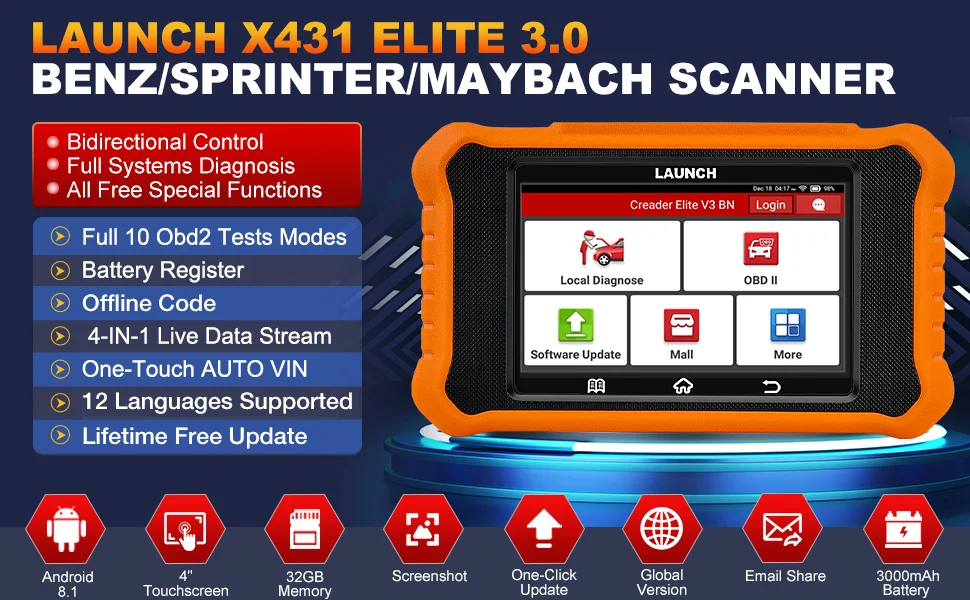
The 2026 LAUNCH X431 Elite V3.0 Peugeot diagnostic scanner is designed for Peugeot owners, professional technicians, independent garages and automotive enthusiasts who need more than a basic OBD2 code reader.
Unlike simple engine-code readers, this professional Peugeot diagnostic tool can communicate with multiple electronic control systems, retrieve diagnostic trouble codes, display live data and perform supported maintenance or active-test functions.
It combines:
-
Full-system vehicle diagnosis
-
Bidirectional control
-
Peugeot maintenance reset functions
-
ECU coding and adaptation capabilities
-
Auto VIN identification
-
Live-data graphing
-
Diagnostic report generation
-
Full OBD2 testing
-
WiFi software updates
Function availability depends on the specific Peugeot model, production year, control module and regional configuration.
Why Choose the LAUNCH X431 Elite V3.0 for Peugeot?
Brand-Specific Diagnostic Software
The Peugeot version includes dedicated diagnostic software developed for supported Peugeot vehicles.
This allows the scanner to access more vehicle systems and service functions than a standard universal OBD2 code reader.
Instead of only checking the engine control module, the scanner may access systems such as:
-
Engine control module
-
Automatic transmission
-
Anti-lock braking system
-
Supplemental restraint system
-
Electronic parking brake
-
Battery management system
-
Tire-pressure monitoring system
-
Steering-angle system
-
Body control module
-
Air-conditioning system
-
Instrument cluster
-
Gateway module
-
Suspension system
-
Lighting system
-
Immobilizer-related modules
-
Driver-assistance modules
The exact module list depends on the vehicle.
Fast Android-Based Operating System
The LAUNCH X431 Elite V3.0 uses an Android-based operating system with a touchscreen interface.
Its compact design allows technicians to navigate vehicle menus, read fault codes and review live data directly from the device.
The interface is designed to reduce diagnostic time and simplify access to common functions.
Cost-Effective Professional Diagnosis
A professional workshop may charge a diagnostic fee each time a Peugeot warning light appears.
With a compatible Peugeot diagnostic scanner, users can perform initial fault-code checks, review live sensor data and identify the affected system before replacing parts.
This can help reduce unnecessary repairs and improve workshop efficiency.
OE-Level Full-System Diagnosis for Peugeot Vehicles
Scan Multiple Electronic Control Modules
The LAUNCH X431 Elite Peugeot scanner can communicate with supported electronic control units throughout the vehicle.
A full-system scan can help identify faults that may not appear through a basic engine-only code reader.
Typical systems may include:
-
ECM or PCM
-
TCM
-
ABS
-
SRS
-
EPB
-
BMS
-
TPMS
-
SAS
-
BCM
-
HVAC
-
Instrument cluster
-
Gateway
-
Parking-assistance system
-
Lighting control
-
Electronic suspension
-
Cruise-control system
Read and Clear Diagnostic Trouble Codes
The scanner can read stored, pending and manufacturer-specific trouble codes from supported modules.
After the vehicle has been correctly inspected and repaired, the tool can clear eligible diagnostic trouble codes.
Clearing a fault code without repairing the underlying problem does not fix the vehicle. If the fault remains, the warning light may return.
Read ECU Information
The device can display available electronic control unit information, such as:
-
ECU identification
-
Module name
-
Hardware number
-
Software number
-
Calibration information
-
Control-unit version
-
Vehicle configuration information
This information can be useful when diagnosing communication problems or replacing electronic modules.
View Freeze-Frame Data
Freeze-frame data records operating conditions when certain faults are detected.
Depending on the vehicle and control module, available information may include:
-
Engine speed
-
Vehicle speed
-
Coolant temperature
-
Intake-air temperature
-
Throttle position
-
Fuel-trim data
-
Battery voltage
-
Engine load
Freeze-frame data can help technicians understand when and how a fault occurred.
Peugeot Bidirectional Control and Active Tests
What Is Bidirectional Control?
Bidirectional control allows the diagnostic scanner to send commands to a supported vehicle control module.
Instead of waiting for a component to operate during normal driving, the technician can command the component to activate through the scanner.
This helps determine whether the fault comes from:
-
The electronic control unit
-
A wiring problem
-
A sensor
-
A relay
-
An actuator
-
The mechanical component itself
Supported Active Tests May Include
Depending on the Peugeot model and year, available active tests may include:
-
Turn the cooling fan on or off
-
Activate the fuel pump
-
Operate the horn
-
Switch exterior lights on or off
-
Operate interior lighting
-
Control the windshield wipers
-
Test door locks
-
Raise or lower supported windows
-
Activate the air-conditioning compressor
-
Test injectors
-
Operate valves or solenoids
-
Test electronic parking brake components
-
Perform ABS pump activation
-
Test instrument-cluster indicators
-
Calibrate supported seats
-
Operate the sunroof
-
Test parking-assistance components
Why Active Testing Is Useful
Suppose a Peugeot cooling fan does not operate when the engine becomes hot.
With bidirectional control, the technician may command the fan to run.
If the fan responds, the motor and power circuit may be functional, and the fault may be related to a sensor, control command or operating condition.
If the fan does not respond, further inspection may be required for the fan motor, relay, fuse, wiring or control module.
This method can reduce diagnostic time and unnecessary component replacement.
ECU Coding, Adaptation and Personalization
Peugeot ECU Coding Functions
The LAUNCH X431 Elite V3.0 may support ECU coding, adaptation, matching and configuration functions on selected Peugeot vehicles.
These functions may be required after:
-
Replacing an electronic module
-
Installing a new component
-
Changing a battery
-
Replacing injectors
-
Replacing a throttle body
-
Repairing a transmission
-
Replacing a steering-angle sensor
-
Installing supported lighting components
-
Performing vehicle configuration changes
ECU coding coverage varies significantly by model and year.
Component Matching and Replacement
After replacing certain electronic components, the new part may need to be introduced to the vehicle control system.
Supported procedures may include:
-
Module matching
-
Component initialization
-
Adaptive-value reset
-
Injector coding
-
Battery registration
-
Throttle adaptation
-
Transmission relearn
-
Steering-angle calibration
-
Window initialization
-
Sunroof initialization
Hidden Functions and Vehicle Customization
Some supported Peugeot vehicles may allow configuration changes through available coding menus.
Possible functions may include:
-
Automatic door-lock settings
-
Lighting configuration
-
Daytime running light settings
-
Welcome-light settings
-
Window-operation preferences
-
Mirror settings
-
Instrument-panel options
-
Start-stop system preferences
-
Warning-sound configuration
Not every Peugeot supports these functions. Available options depend on the installed modules and software configuration.
Peugeot Maintenance and Reset Functions
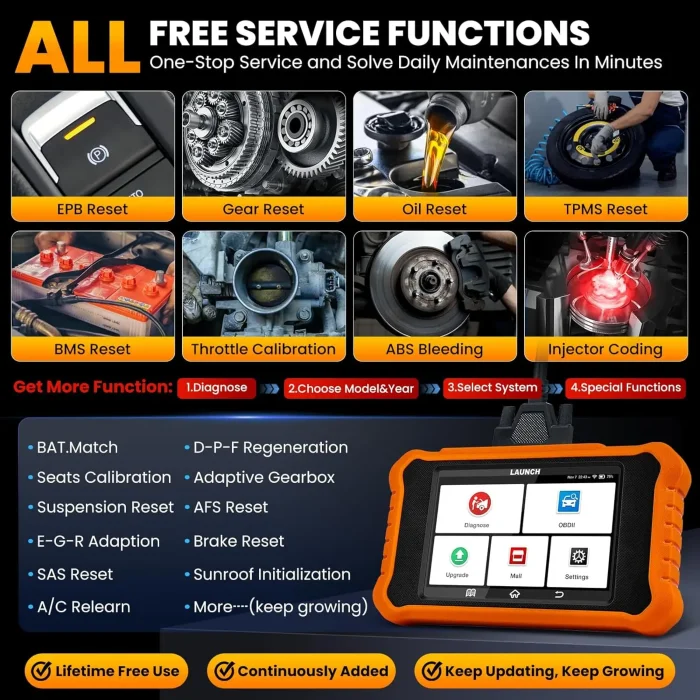
The LAUNCH X431 Elite V3.0 is designed to support professional service and maintenance procedures for compatible Peugeot vehicles.
Oil Service Reset
After completing an engine-oil and filter change, the scanner can reset the maintenance reminder on supported vehicles.
This allows the vehicle to begin calculating the next service interval.
Electronic Parking Brake Reset
The EPB service function may retract or release the electronic parking brake during rear brake-pad replacement.
After installation, the scanner may help initialize or calibrate the braking system.
ABS Brake Bleeding
When air enters the ABS hydraulic unit, conventional brake bleeding may not remove all trapped air.
The ABS bleeding function can command the ABS pump and valves during the bleeding procedure on supported Peugeot models.
Steering-Angle Sensor Calibration
The steering-angle sensor may require calibration after:
-
Wheel alignment
-
Steering-rack replacement
-
Steering-wheel removal
-
Suspension repair
-
Battery disconnection
-
Sensor replacement
Correct calibration helps the ABS, stability-control and steering systems identify the steering-wheel position.
Battery Registration and Matching
Modern Peugeot vehicles may use intelligent battery-monitoring systems.
After replacing the battery, the vehicle may require battery registration or adaptation so that the charging system can manage the new battery correctly.
Supported procedures may include:
-
Replacing a battery with the same specification
-
Replacing a battery with a different capacity
-
Replacing a battery with another supported battery type
-
Resetting battery-aging information
-
Registering the new battery
Throttle Adaptation
After cleaning or replacing the throttle body, the throttle valve may require initialization or relearning.
Throttle adaptation can help the engine control unit identify the correct closed-throttle and operating positions.
Injector Coding
Some Peugeot diesel and gasoline engines require injector correction codes to be entered after injector replacement.
Injector coding helps the engine control module compensate for individual injector characteristics.
DPF Regeneration
For supported diesel Peugeot vehicles, the scanner may provide diesel particulate filter functions such as:
-
Reading DPF status
-
Checking soot-load information
-
Reviewing regeneration conditions
-
Performing service regeneration
-
Resetting related values after repair
Forced DPF regeneration should only be performed when the vehicle meets the required safety and operating conditions.
TPMS Reset
The tire-pressure monitoring system may require relearning or reset after:
-
Tire rotation
-
Sensor replacement
-
Wheel replacement
-
Tire-pressure correction
-
Loss of sensor communication
Transmission Adaptation
After transmission repair, fluid service, component replacement or software work, selected Peugeot vehicles may require transmission adaptation or relearning.
Additional Service Functions
Depending on vehicle compatibility, available functions may also include:
-
AdBlue reset
-
EGR adaptation
-
Gear learning
-
Camshaft and crankshaft relearning
-
Air-conditioning initialization
-
Window calibration
-
Sunroof initialization
-
Seat calibration
-
Suspension-height calibration
-
Start-stop reset
-
Transport-mode activation or deactivation
-
Diesel exhaust-fluid level reset
-
NOx sensor reset
-
Clutch adaptation
-
Gear-selector calibration
-
Coolant bleeding
-
Rain-sensor initialization
-
Headlamp calibration
-
Airbag reset procedures
-
Engine power-balance monitoring
-
Adaptive-data reset
Auto VIN and Automatic Vehicle Scanning
Fast Vehicle Identification
The Auto VIN function can automatically detect supported vehicle information, including:
-
Manufacturer
-
Model
-
Production year
-
VIN
-
Vehicle configuration
After recognition, the scanner can enter the appropriate diagnostic software automatically.
What Happens If Auto VIN Does Not Work?
Auto VIN is not supported by every Peugeot vehicle.
When automatic identification fails, users can:
-
Select Peugeot manually.
-
Choose the vehicle model.
-
Select the production year or vehicle platform.
-
Enter the VIN manually when required.
-
Use standard OBD2 diagnosis to confirm communication.
Manual selection may be necessary for older vehicles or models with limited VIN communication.
Live Data and Four-in-One Graphing
Real-Time Sensor Data
Live data allows users to view operating information sent by vehicle sensors and control modules.
Common data items may include:
-
Engine RPM
-
Coolant temperature
-
Intake-air temperature
-
Accelerator-pedal position
-
Throttle position
-
Fuel pressure
-
Oxygen-sensor data
-
Short-term fuel trim
-
Long-term fuel trim
-
Battery voltage
-
Wheel-speed sensor data
-
DPF differential pressure
-
Boost pressure
-
Transmission temperature
Four-Graph Combined Display
The four-in-one graphing function allows users to display several related data parameters together.
For example, a technician diagnosing engine performance may compare:
-
Engine RPM
-
Throttle position
-
Fuel pressure
-
Oxygen-sensor signal
Viewing multiple parameters together can make abnormal relationships easier to identify.
Record, Replay and Screenshot
The scanner may allow users to:
-
Record diagnostic data
-
Replay saved live data
-
Capture screenshots
-
Review diagnostic history
-
Compare before-and-after repair information
These functions are useful when diagnosing intermittent faults.
Full OBD2 Functions for Compatible Vehicles
In addition to Peugeot-specific diagnosis, the scanner supports standard OBD2 functions for compatible vehicles.
Standard OBD2 Functions Include
-
Read generic engine trouble codes
-
Clear generic engine trouble codes
-
Display live data
-
View freeze-frame data
-
Check I/M readiness
-
Read vehicle information
-
Turn off the malfunction indicator light after repair
-
Perform oxygen-sensor testing
-
View on-board monitoring results
-
Access Mode 6 test information
-
Perform supported EVAP system tests
Standard OBD2 functions mainly apply to emissions-related engine and transmission systems. Full-system Peugeot diagnosis uses the brand-specific diagnostic software.
Diagnostic Reports and Workshop Functions
Automatic Health Report
The scanner can generate a vehicle health report containing detected control modules and diagnostic trouble codes.
A pre-repair report can be created before maintenance, while a post-repair report can be generated afterward.
Share and Print Diagnostic Reports
Diagnostic reports may be saved locally or shared electronically.
This is useful for:
-
Explaining faults to customers
-
Recording workshop inspections
-
Comparing repair results
-
Maintaining vehicle service records
-
Providing professional documentation
Diagnostic History
The device can store previous diagnostic sessions, allowing users to reopen vehicle information and review earlier tests.
This can improve efficiency when the same vehicle returns for additional repairs.
Lifetime WiFi Software Updates
Easy Wireless Updating
The LAUNCH X431 Elite V3.0 supports software updates through WiFi.
Users can access available updates directly from the device without connecting it to a computer.
Updates may provide:
-
Expanded vehicle coverage
-
Improved system communication
-
Additional service functions
-
Software corrections
-
Interface improvements
-
New diagnostic capabilities
Update policies may depend on the seller, device version and regional product package. Confirm the update terms before ordering.
Supported Languages
The device may support multiple interface languages, including:
-
English
-
French
-
Spanish
-
German
-
Italian
-
Portuguese
-
Russian
-
Japanese
-
Korean
-
Traditional Chinese
-
Polish
Language availability should be confirmed before purchase because supported languages may vary by product version.
Peugeot Vehicle Compatibility
The LAUNCH X431 Elite V3.0 Peugeot version is intended for compatible Peugeot passenger cars, SUVs and commercial vehicles.
Possible supported Peugeot models may include selected versions of:
-
Peugeot 106
-
Peugeot 107
-
Peugeot 108
-
Peugeot 2008
-
Peugeot 205
-
Peugeot 206
-
Peugeot 207
-
Peugeot 208
-
Peugeot 3008
-
Peugeot 301
-
Peugeot 306
-
Peugeot 307
-
Peugeot 308
-
Peugeot 4007
-
Peugeot 4008
-
Peugeot 405
-
Peugeot 406
-
Peugeot 407
-
Peugeot 408
-
Peugeot 5008
-
Peugeot 508
-
Peugeot 605
-
Peugeot 607
-
Peugeot 806
-
Peugeot 807
-
Peugeot RCZ
-
Peugeot Partner
-
Peugeot Expert
-
Peugeot Boxer
-
Peugeot Rifter
-
Peugeot Traveller
Compatibility does not mean that every function is supported on every listed vehicle.
What Determines Function Compatibility?
Available functions depend on:
-
Vehicle model
-
Production year
-
Engine type
-
Transmission type
-
Regional specification
-
Installed electronic modules
-
ECU software version
-
Diagnostic communication protocol
Before ordering, provide the vehicle VIN, production year and required function to the seller for compatibility confirmation.
How to Use the LAUNCH X431 Elite V3.0 on a Peugeot
Step 1: Connect the Scanner
Locate the vehicle OBD2 diagnostic port.
It is commonly found beneath the dashboard, near the steering column or behind a removable interior panel.
Connect the scanner cable securely to the diagnostic port.
Step 2: Turn On the Ignition
Switch the ignition to the ON position.
The engine does not normally need to be started unless the selected diagnostic procedure specifically requires it.
Step 3: Configure the Device
Select the preferred:
-
Language
-
Time zone
-
WiFi network
-
Device settings
Step 4: Update the Software
Open the update menu and download the latest available Peugeot diagnostic software.
Install all required application and vehicle-software updates before beginning diagnosis.
Step 5: Identify the Vehicle
Select Auto VIN to identify the vehicle automatically.
When Auto VIN fails, select Peugeot manually and enter the correct model and production information.
Step 6: Run a Full-System Scan
Use the health-report or automatic-scan function to inspect all available control modules.
Review the detected diagnostic trouble codes.
Step 7: Diagnose Before Clearing Codes
Read:
-
Trouble-code descriptions
-
Freeze-frame data
-
ECU information
-
Live-data values
-
Related system information
Repair the underlying problem before clearing the code.
Step 8: Perform Supported Service Functions
Select the necessary maintenance, active-test, adaptation or coding function.
Follow the on-screen instructions carefully.
Who Should Buy This Peugeot Diagnostic Scanner?
Peugeot Owners and DIY Users
The scanner can help Peugeot owners understand warning lights and inspect vehicle systems before visiting a repair shop.
It is especially useful for owners who perform their own maintenance.
Professional Mechanics
Technicians can use the scanner for:
-
Full-system scanning
-
Active testing
-
Maintenance procedures
-
Component adaptation
-
Live-data analysis
-
Diagnostic-report generation
Independent Workshops
Independent garages working mainly on Peugeot vehicles can use the brand-specific version as a cost-effective diagnostic solution.
Used-Car Dealers
Used-car dealers can perform vehicle health scans and identify stored fault codes before purchasing or selling a Peugeot.
Frequently Asked Questions
Does the Peugeot Version Diagnose Every Car Brand?
No.
The included professional diagnostic software is mainly designed for compatible Peugeot vehicles.
Standard OBD2 engine diagnosis may work on other compliant vehicles, but full-system diagnosis, bidirectional tests and service functions require the appropriate brand software.
Can It Diagnose the Engine, ABS, Airbag and Transmission?
It can diagnose these systems on compatible Peugeot vehicles.
System availability varies by model, year and installed control module.
Does It Support Bidirectional Control?
Yes, the scanner supports active tests on compatible Peugeot vehicles.
The exact list of active tests depends on the vehicle.
Can It Perform Peugeot ECU Coding?
The scanner may support ECU coding, adaptation, matching and configuration on selected Peugeot models.
It is not a universal online-programming replacement for every dealership procedure.
Can It Reset the Peugeot Oil Service Light?
Yes, oil service reset is available for many compatible Peugeot vehicles.
Can It Perform ABS Bleeding?
ABS bleeding is supported on selected models.
Confirm the specific vehicle before purchase.
Can It Register a New Battery?
Battery registration or matching is available on supported Peugeot vehicles equipped with a battery-management system.
Can It Regenerate a Peugeot DPF?
DPF service regeneration may be available on compatible diesel Peugeot vehicles.
The required operating and safety conditions must be met before regeneration.
Does It Include Free Updates?
The product may include WiFi software updates according to the seller’s package and update policy.
Confirm whether updates are free for life, limited to a specific period or subject to additional conditions.
Will Every Function Work on My Peugeot?
No diagnostic scanner can guarantee every function on every vehicle.
Always check compatibility using the VIN, model year, engine type and required function before ordering.
Final Review
The 2026 LAUNCH X431 Elite V3.0 Peugeot diagnostic scanner offers a practical combination of full-system diagnosis, active testing, maintenance resets, ECU adaptation, live-data analysis and professional report generation.
It is more capable than a basic Peugeot OBD2 code reader because it can communicate with multiple control modules and perform supported service procedures.
Its main advantages include:
-
Dedicated Peugeot diagnostic software
-
Full-system scanning
-
Bidirectional control
-
ECU coding and adaptation
-
Maintenance reset functions
-
Auto VIN identification
-
Four-in-one live-data graphing
-
Diagnostic-history recording
-
Health-report generation
-
WiFi software updates
-
Compact touchscreen design
For the best purchasing experience, confirm the following before ordering:
-
Your Peugeot model and production year
-
The complete VIN
-
The engine and transmission type
-
The system you need to diagnose
-
The maintenance or coding function you need
-
The update and language policy
-
Whether additional adapters are required
Choosing the correct Peugeot version ensures that you receive the appropriate vehicle software and the best possible diagnostic coverage.
You May Also Like
-
-
 Launch X431 SmartLink C 2.0 Heavy Duty Truck Di...US$ 1080.00 US$ 1200.00
 -
 LAUNCH CRP129 HD Heavy Duty Truck Scanner,Full ...US$ 629.10 US$ 699.00
 -
 LAUNCH X431 CRP919X BT OBD2 Scanner Automotive ...US$ 629.10 US$ 699.00
 -
 LAUNCH X431 TSGUN TPMS Tire Pressure Diagnostic...US$ 233.10 US$ 259.00
 -
 LAUNCH X431 PAD 7 VII PAD7 PADVII Car Diagnosti...US$ 3059.10 US$ 3399.00
 -
 LAUNCH X431 PROS V5 Vehicle Diagnostic Tools OB...US$ 713.75 US$ 793.06
 -
 LAUNCH X431 CRP919X BT Automotive Diagnostic Sc...US$ 449.44 US$ 499.38
Recently Viewed
-
 Original Ford VCM3 Diagnostic Tool Your Compreh...US$ 891.00 US$ 990.00
 -
 VXDIAG NX300 Volvo Car Diagnostic Tool with 201...US$ 116.10 US$ 129.00
- Company Info
- Feedback
- Customer Reviews
- About Us
- Contact Us
- News
- User Center
- Forget Password
- My Orders
- Tracking Order
- My Account
- Register
- Payment & Shipping
- Customs & Taxes
- Locations We Ship To
- Shipping Methods
- Payment Methods
- Company Policies
- Return Policy
- Privacy Policy
- Terms of Use
Customer Reviews