

|

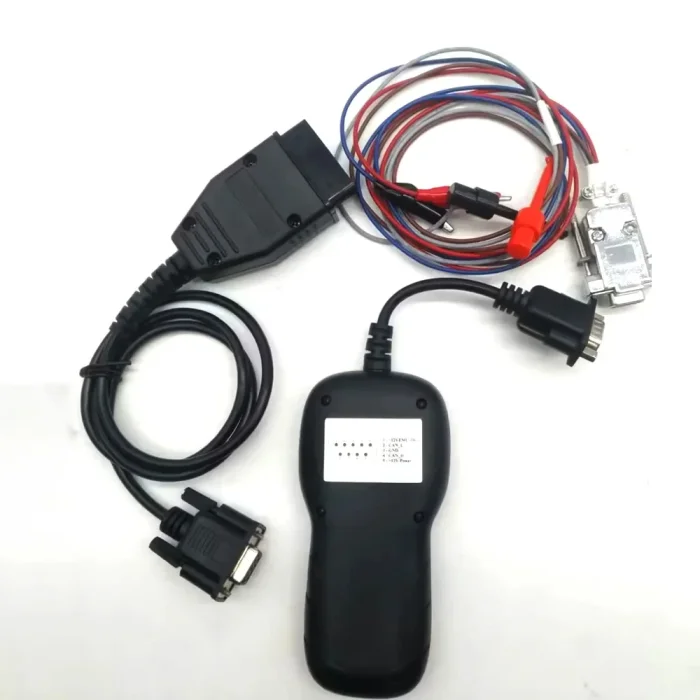


PSA IMMO Tool for Peugeot Citroen PIN Code Reading and IMMO Emulator From 2001 to 2018 Year


-
- Product Name: PSA IMMO Tool for Peugeot Citroen PIN Code Reading and IMMO Emulator From 2001 to 2018 Year
- Item NO.: 29455756
- Weight: 1 kg = 2.2046 lb = 35.2740 oz
- Category: Car Diagnostic Tools > For Peugeot Citroen
- Creation Time: 2026-08-31
The PSA IMMO Tool is a specialized immobilizer-related diagnostic device designed for Peugeot and Citroen vehicles. It combines PIN code reading, PIN code calculation, key simulation and IMMO emulator functions into one compact tool.
For technicians and automotive locksmiths working with PSA vehicles, obtaining the correct security PIN can be an important step in immobilizer diagnosis and legitimate key-related service procedures. Instead of relying entirely on conventional diagnostic equipment, this tool is designed to obtain security information through the vehicle's communication system.
The tool mainly works through the OBD diagnostic connection, while some vehicles may require a direct connection to the CAN-H and CAN-L lines.
What Is the PSA IMMO Tool?
The PSA IMMO Tool is designed for selected Peugeot and Citroen vehicles from around 2001 onward, subject to the specific vehicle's immobilizer and communication configuration.
Its main functions can be divided into two operating modes:
- Calculator Mode – designed to read or calculate the vehicle security PIN through the diagnostic communication system.
- Emulator Mode – designed to simulate a valid key signal for immobilizer-related diagnostic testing.
Key Functions at a Glance
Function Description PIN Code Reading Obtains the security PIN through supported vehicle communication systems PIN Calculator Calculates the security code using the vehicle's immobilizer data Key Simulator Simulates a working key for supported diagnostic applications IMMO Emulator Allows PIN information to be entered into the emulator OBD Connection Supports direct connection through the vehicle diagnostic port on compatible vehicles CAN Connection Allows direct CAN-H/CAN-L connection on vehicles where OBD communication is unavailable
PSA PIN Code Calculator Mode
How Does Calculator Mode Work?
The calculator mode is designed to retrieve the immobilizer security code through the vehicle's diagnostic communication system.
According to the supplied operating procedure, the user connects the tool to the vehicle using the supplied OBD cable, selects "Calculator", and cycles the ignition several times.
Basic Calculator Procedure
- Connect the PSA IMMO Tool to the vehicle.
- Select Calculator mode.
- Cycle the ignition approximately eight times as instructed by the tool.
- The internal counter increases with each ignition cycle.
- After the eighth cycle, the calculator begins processing.
- Wait approximately five minutes for the security code to appear.
The exact procedure can vary depending on the vehicle and system configuration, so the tool's instructions should be followed for the specific application.
Why Is a Working Key Required?
The supplied product information states that extracting the PIN through the OBD connection requires a working key because the tool obtains information by intercepting communication between the BSI and ECU.
This is an important distinction when choosing an immobilizer tool. The calculator function is not necessarily intended to replace every key-related procedure.
PSA IMMO Emulator Mode
What Does the Emulator Do?
Once the security PIN has been obtained, the tool can be switched to Emulator Mode.
The emulator is designed to simulate the presence of a working key in supported applications. This can be useful when diagnosing immobilizer or vehicle security-system problems.
Instead of using the original key during certain diagnostic procedures, the emulator can provide a simulated key-related signal to the vehicle's immobilizer system.
When Can an IMMO Emulator Be Useful?
An IMMO emulator may be useful for professional diagnostic work involving:
- Immobilizer system diagnosis
- Security-system troubleshooting
- ECU and BSI-related diagnostics
- Key-related system testing
- Investigating communication problems between immobilizer components
The actual functions available depend on the vehicle's immobilizer architecture.
OBD Connection and CAN-H/CAN-L Connection
Using the OBDII Port
For many compatible Peugeot and Citroen vehicles, the PSA IMMO Tool can be connected through the OBDII diagnostic socket.
This makes the installation relatively straightforward because the technician can use the supplied OBD cable rather than accessing individual wiring points.
However, OBD operation depends on whether the vehicle's diagnostic connector provides the required CAN communication lines.
When Is a Direct CAN Connection Required?
Not every PSA vehicle can be operated entirely through the diagnostic socket.
Some vehicles may require the tool to be connected directly to the CAN-H and CAN-L lines under the hood.
Why Is This Important?
The diagnostic connector on some vehicles may not provide the necessary CAN connections required by the tool. In such cases, connecting directly to the appropriate CAN-H and CAN-L lines can provide the required communication path.
Therefore, technicians should check the vehicle's wiring and communication configuration before starting the procedure.
Peugeot and Citroen Compatibility
Peugeot Applications
The PSA IMMO Tool is designed for use with supported original Peugeot engine and immobilizer systems.
It is intended to cover a broad range of Peugeot applications beginning around 2001, although actual compatibility depends on the individual vehicle, ECU, BSI and immobilizer configuration.
Citroen Applications
The same general principle applies to Citroen vehicles.
The tool can be used with supported Citroen engine systems for PIN-related and immobilizer diagnostic applications.
Vehicle Compatibility Considerations
Although the product information describes support for PSA vehicles from 2001 onward, users should not assume that every Peugeot or Citroen model will operate identically.
Compatibility can depend on:
- Vehicle model
- Production year
- ECU type
- BSI version
- Immobilizer system
- CAN communication configuration
- Diagnostic connector wiring
For this reason, checking the exact vehicle before purchasing or using the tool is recommended.
How to Use the PSA IMMO Tool
Step 1: Prepare the Vehicle
Make sure the vehicle battery is adequately charged and the ignition system is in normal working condition.
Park the vehicle safely and locate the diagnostic connector.
Step 2: Connect the Tool
Connect the supplied OBDII cable between the PSA IMMO Tool and the vehicle's diagnostic socket.
If the vehicle does not provide the necessary CAN-H and CAN-L connections through the diagnostic port, use the supplied CAN connection cable according to the vehicle-specific connection instructions.
Step 3: Select Calculator Mode
Choose Calculator on the device.
Follow the ignition-cycle procedure displayed or specified for the tool.
Step 4: Wait for PIN Calculation
After the required ignition cycles, the device begins processing the immobilizer information.
The supplied instructions indicate that the calculation process may take approximately five minutes.
Step 5: Use Emulator Mode
After obtaining the security PIN, select the Emulator function when appropriate.
Enter the required PIN information into the emulator and follow the tool's operating procedure.
Important Notes Before Buying
Not Every Vehicle Uses the Same Connection Method
One of the most important points is that the tool does not necessarily operate through the OBD port on every compatible vehicle.
Some applications may require direct CAN-H and CAN-L access.
Older Vehicles May Not Be Supported
The supplied product information specifically states that the tool is intended for supported PSA vehicles and does not support certain older vehicles.
Therefore, vehicle compatibility should always be confirmed before purchase.
A Working Key May Be Needed
The PIN extraction procedure through OBD requires a working key according to the supplied product description.
This means the calculator function should not be viewed as a universal replacement for every lost-key situation.
Always Check Vehicle Configuration
Two vehicles with similar model years can sometimes use different ECU, BSI or immobilizer configurations.
For professional use, confirming the exact model and system type is recommended before starting any operation.
PSA IMMO Tool vs. Conventional Diagnostic Equipment
A conventional diagnostic scanner is primarily designed to read fault codes, view live data, perform actuator tests and access vehicle control modules.
The PSA IMMO Tool has a more specialized purpose.
Conventional Diagnostic Scanner
A typical diagnostic scanner may focus on:
- Reading DTCs
- Clearing fault codes
- Viewing live data
- ECU communication
- System diagnostics
- Service functions
PSA IMMO Tool
The PSA IMMO Tool focuses more specifically on:
- PIN code calculation
- Immobilizer-related information
- Key simulation
- Emulator functions
- PSA-specific security-system diagnostics
Therefore, it can be considered a specialized PSA immobilizer tool rather than a general-purpose diagnostic scanner.
Package Contents
The standard package includes:
Included Accessories
- 1 × PSA IMMO Tool Handle
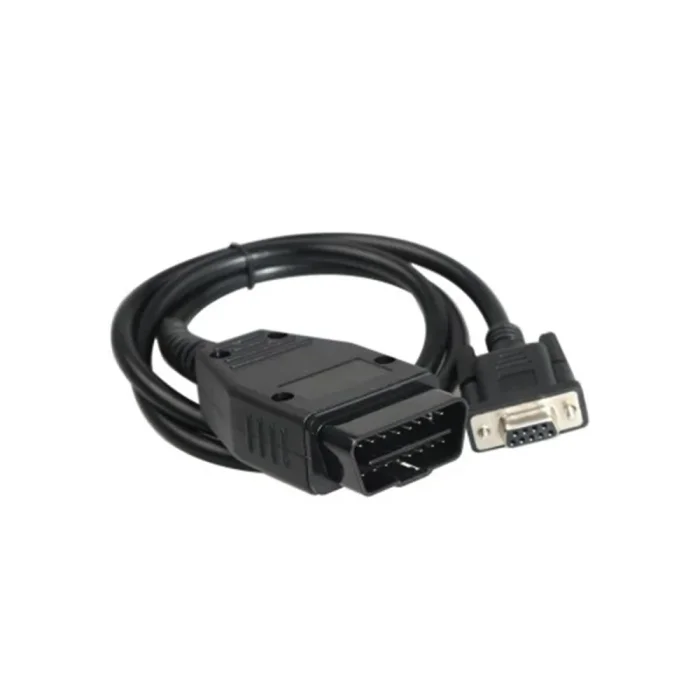
- 1 × OBDII Cable
- 1 × CAN Connection Cable
The included OBD and CAN cables allow the tool to be used with different connection configurations depending on the supported vehicle.
Frequently Asked Questions
What vehicles does the PSA IMMO Tool support?
The product is designed for supported Peugeot and Citroen vehicles from approximately 2001 onward. Actual compatibility depends on the vehicle's ECU, BSI, immobilizer and CAN configuration.
Can the PSA IMMO Tool read a PIN through OBD?
Yes, the calculator function is designed to obtain the security PIN through OBD on supported vehicles. The supplied instructions indicate that a working key is required for this procedure.
Does it work with every Peugeot and Citroen?
No diagnostic or immobilizer tool should be assumed to work with every vehicle. Compatibility depends on the specific vehicle and immobilizer system.
Does the tool always use the OBD port?
No. While many compatible vehicles can be accessed through OBDII, some applications may require direct connection to the CAN-H and CAN-L lines.
What is the purpose of the emulator?
The emulator is designed to simulate a working key on supported vehicles after the required security PIN has been obtained. It can be useful for immobilizer and security-system diagnosis.
How long does PIN calculation take?
The supplied instructions indicate that after the required ignition-cycle procedure, the calculation may take approximately five minutes before the security code is displayed.
What cables are included?
The package includes an OBDII cable and a CAN connection cable, along with the main PSA IMMO Tool handle.
Conclusion
The PSA IMMO Tool is a specialized solution for professionals working with supported Peugeot and Citroen immobilizer systems. Its combination of PIN code calculator, PIN reader, key simulator and IMMO emulator functions makes it different from a conventional automotive diagnostic scanner.
The tool is particularly focused on PSA applications where security PIN information and immobilizer communication are required for legitimate diagnostic and service work.
Its OBDII connection provides a convenient solution for many supported vehicles, while the additional CAN-H/CAN-L connection offers an alternative for vehicles where the diagnostic socket does not provide the necessary CAN communication.
Before purchasing, users should confirm the exact Peugeot or Citroen model, ECU/BSI configuration and connection method to ensure compatibility with their vehicle.
You May Also Like
-
 High Quality Peugeot Diagnostic Tools PP2000 Fu...US$ 150.15 US$ 165.00
 -
 ALicar IO PROG Full Version ECU TCM BCM and EPS...US$ 539.10 US$ 599.00
 -
 Newest Release LEXIA-3 Diagbox V9.150 Lexia3 PP...US$ 89.91 US$ 99.90
 -
 Obd Diagnostic Cable Module S1279 Interface for...US$ 35.10 US$ 39.00
 -
 ALicar ACT V2 Car Coding Tool Support Diagnosis...US$ 262.50 US$ 350.00
 -
 Genuine PSA Core XS Diagnostic Tool for Peugeot...US$ 2304.00 US$ 2400.00
Recently Viewed
-
 TY200 Locksmith Tool Universal Remote Control G...US$ 170.10 US$ 189.00
- Company Info
- Feedback
- Customer Reviews
- About Us
- Contact Us
- News
- User Center
- Forget Password
- My Orders
- Tracking Order
- My Account
- Register
- Payment & Shipping
- Customs & Taxes
- Locations We Ship To
- Shipping Methods
- Payment Methods
- Company Policies
- Return Policy
- Privacy Policy
- Terms of Use
Customer Reviews