

|



Foxwell NT604 Elite Car Scanner ENG/TCM/ABS/SRS System Automotive Full OBD2 Model Diagnostic Tool


-
- Product Name: Foxwell NT604 Elite Car Scanner ENG/TCM/ABS/SRS System Automotive Full OBD2 Model Diagnostic Tool
- Item NO.: 28710095
- Weight: 1 kg = 2.2046 lb = 35.2740 oz
- Category: ALicar Vehicle Tools > Code Reader Scanner
- Creation Time: 2025-12-21
When it comes to professional vehicle diagnostics without paying dealership-level prices, the FOXWELL NT604 Elite stands out as one of the most reliable and cost-effective solutions on the market. Designed for both professional technicians and car owners, this enhanced 4-system diagnostic scanner delivers powerful performance, wide vehicle coverage, and lifetime free updates.
Why Choose FOXWELL NT604 Diagnostic Scanner
Professional 4-System Diagnostics in One Device
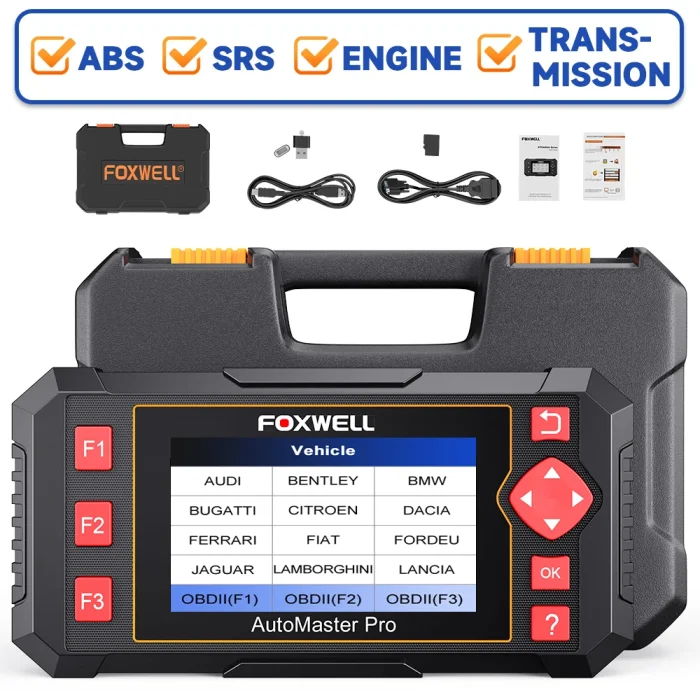
The FOXWELL NT604 Elite is an enhanced diagnostic tool that supports Engine, ABS, SRS (Airbag), and Transmission systems, helping you quickly identify issues and maintain optimal vehicle performance.
Key advantages include:
-
Easy and affordable troubleshooting solution
-
Supports over 60+ vehicle brands worldwide
-
Lifetime free software updates
-
No extra software or subscription fees
-
Compact, lightweight, and easy to carry
Whether you are a DIY enthusiast or a professional mechanic, the NT604 Elite saves time, money, and effort.
FOXWELL NT604 Scanner Key Features Overview
1. Full OBDII 10 Modes Support
Besides full system diagnostics, NT604 Elite also functions as a complete OBD2 code reader, supporting all 10 OBDII test modes:
OBDII Diagnostic Functions
-
Read Codes – Displays detailed Diagnostic Trouble Code (DTC) descriptions
-
Erase Codes & Reset – Clears fault codes and turns off the Check Engine Light
-
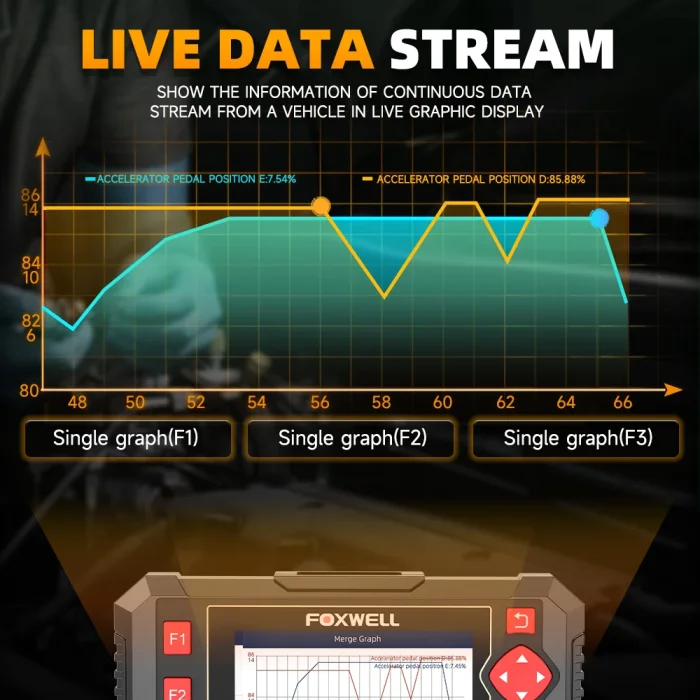
Live Data Stream – Reads real-time ECU/PCM data with graphical display
-
I/M Readiness Status – Confirms emission system readiness for inspections
-
Freeze Frame Data – Views vehicle conditions at the moment a fault occurred
-
O2 Sensor Test – Retrieves oxygen sensor monitoring test results
-
On-Board Monitor Test – Displays results for emission-related systems
-
Vehicle Information – Reads VIN, CID, and CVN details
-
Component Test – Actuates certain vehicle components for functional testing
-
Continuous Data Viewing – Smooth waveform live data monitoring
Owning the NT604 Elite means you don’t need a separate OBD2 scanner.
Advanced 4-System Diagnostic Capabilities
Engine System Diagnosis
The NT604 Elite detects problems related to:
-
Ignition system
-
Fuel injection
-
Air/fuel ratio
-
Exhaust emissions
This helps improve engine efficiency, reduce fuel consumption, and lower emissions.
ABS System Diagnosis
Diagnosing ABS issues becomes easier by:
-
Reading ABS fault codes
-
Identifying sensor or module problems
-
Improving braking safety
SRS (Airbag) System Diagnosis
The scanner checks:
-
Impact sensors
-
Control modules
-
Airbag system health
Ensuring maximum safety for the driver and passengers.
Transmission System Diagnosis
For slipping gears or hard shifting, NT604 Elite can:
-
Read transmission fault codes
-
Display live transmission data
-
Evaluate transmission health status
Auto VIN Scan – Faster and Smarter Diagnosis
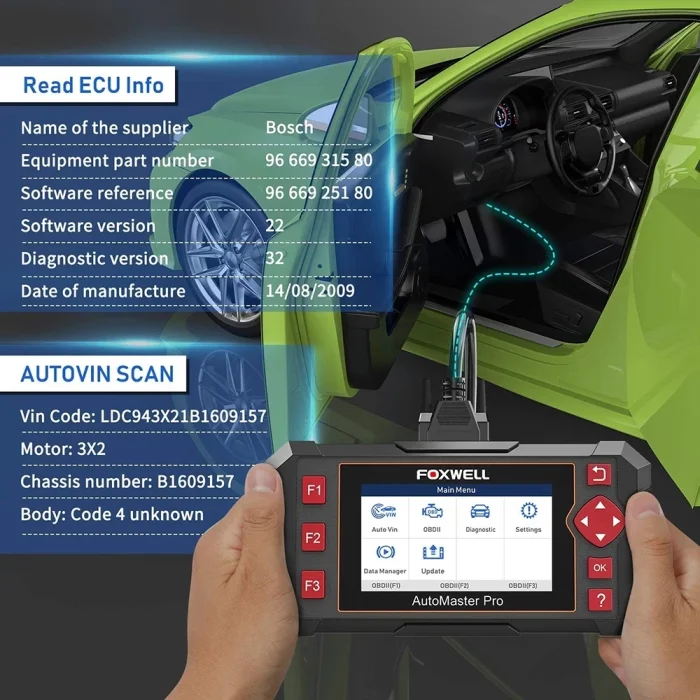
The Auto VIN Scan feature automatically identifies your vehicle information, saving time and reducing manual input errors. Diagnosis becomes faster and more accurate with just one click.
Multi-Language Support
Supported Languages
FOXWELL NT604 supports multiple languages, including:
-
English
-
German
-
French
-
Spanish
-
Italian
-
Portuguese
-
Russian
-
Japanese
-
Korean
-
Dutch
-
Swedish
-
Thai
-
Hungarian
Note: To activate additional languages, simply provide the device serial number to Foxwell customer service after receiving the product.
Wide Vehicle Coverage – 60+ Car Brands Supported
include some latest2020/2021 models
For America
For Chrysler, for Ford, For GM
For Asian
For Acura, for Lexus, for Suzuki, for Daewoo, for Mazda, for Toyota, for Daihatsu, for Mitsubishi, for Fuso, for Honda, for Nissan, for Mahindra, for Hyundai, for Perodua,for Tata, for Hyundai_CV, for Proton, for Infiniti, for Ssang Yong, for Isuzu, for Scion, for Kia, for Subaru
For Europe
for Abarth, for EU ford, for Mercedes, for Samsung, for Alfa-romeo, for Fiat, for Benz, for Seat, for Audi, for Ferrari, for Mini, for Skoda, for Aston Martin, for Jaguar, for Opel, for Smart, for Bentley, for Lancia, for Peugeot, for Sprinter, for BMW, for land Rover, for Renault, for Vauxhall, for Bugatti, for Lamborgini, for Roll-royce, for Volvo, for Citroen, for Maserati, for Porsche, for VW, for Dacia, for Maybach, for Saab, for VW_CV
Easy to Use – Plug and Play Design
How to Use FOXWELL NT604 Elite
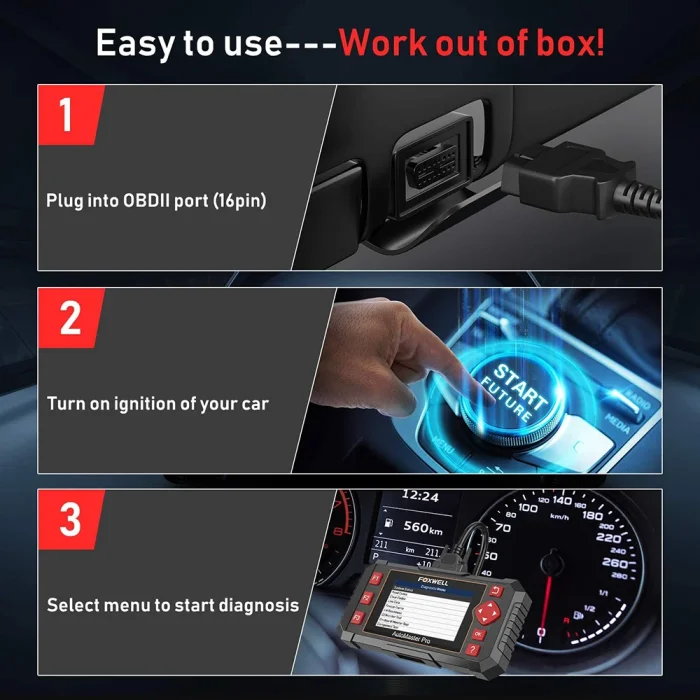
Step-by-Step Operation
-
Plug the scanner into the OBD2 (16-pin) port
-
Turn on the vehicle ignition
-
Select the menu and start diagnosis
No complicated setup required — perfect for beginners and professionals alike.
Lifetime Free Online Updates
How to Update FOXWELL NT604 Elite
Important: NT604 Elite uses FoxAssist, not FoxScanner.
Update Steps
-
Visit the FOXWELL official website
-
Download FoxAssist Installer
-
Register a Foxwell account
-
Connect NT604 Elite to your computer via USB
-
Activate the device automatically using its SN
-
Download and upgrade all available software
-
Wait a few minutes — update complete
Enjoy new features and expanded vehicle coverage at no extra cost.
Package Contents
Each FOXWELL NT604 scan tool package includes:
-
1 × FOXWELL NT604 Scanner
-
1 × User Manual
-
1 × Memory Card
-
1 × USB Cable
-
1 × Diagnostic Cable
-
1 × Original Carton Box
Why FOXWELL NT604 Is the Best Choice
The FOXWELL NT604 Elite OBD2 Diagnostic Tool combines professional-grade diagnostics, wide compatibility, and lifetime free updates into one affordable device. It is the ideal solution for car owners, repair shops, and technicians who want accurate diagnostics without ongoing costs.
You May Also Like
-
 JDiag M400 Motorcycle Diagnostic Scanner ABS Te...US$ 602.10 US$ 669.00
 -
 MST 601 PRO 6IN1 Motorcycle Scanner OBD2 Code R...US$ 161.10 US$ 179.00
 -
 2026 Newest KONNWEI KW340 Car OBD2 Scanner Engi...US$ 71.10 US$ 79.00
 -
 Humzor NP716 Car OBD2 Scanner Universal Key Pro...US$ 359.10 US$ 399.00
 -
 2026 KONNWEI KW330 Car OBD2 Fault Scanner Engin...US$ 71.10 US$ 79.00
 -
 Topdiag M216 OBDII Motorcycle Scanner Diagnosti...US$ 232.20 US$ 258.00
 -
 ANCEL BD300 Bluetooth 5.0 OBD2 Scanner Full Sys...US$ 62.10 US$ 69.00
 -
 XTOOL A30X Car Diagnostic Scanner Tool 26+ Rese...US$ 179.10 US$ 199.00
- Company Info
- Feedback
- Customer Reviews
- About Us
- Contact Us
- News
- User Center
- Forget Password
- My Orders
- Tracking Order
- My Account
- Register
- Payment & Shipping
- Customs & Taxes
- Locations We Ship To
- Shipping Methods
- Payment Methods
- Company Policies
- Return Policy
- Privacy Policy
- Terms of Use
Customer Reviews