

|


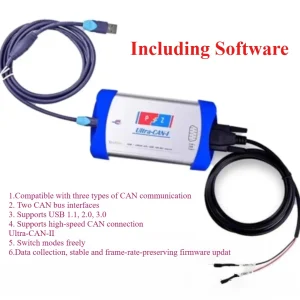
3in1 Ultra CAN-II CAN Analyzer Supports for USBCAN + PCAN/Kvaser + Dual Mode


-
- Product Name: 3in1 Ultra CAN-II CAN Analyzer Supports for USBCAN + PCAN/Kvaser + Dual Mode
- Item NO.: 29401750
- Weight: 1 kg = 2.2046 lb = 35.2740 oz
- Category: ALL CATEGORIES > Hot Car Accessories
- Creation Time: 2026-08-24
When working with CAN bus systems, one of the most annoying problems is having to prepare different CAN interfaces for different software. Some applications expect PCAN hardware, others work with Kvaser devices, while many CAN testing programs are designed around ZLG USB-CAN interfaces.
The Ultra-CAN-II CAN Analyzer is designed to simplify this setup. It combines multiple CAN interface cores into one device and supports PCAN, Kvaser and ZLG USB-CAN compatible modes.
For automotive diagnostics, new energy vehicle development, CAN bus testing, ECU communication and software development, this type of multi-protocol USB-to-CAN interface can reduce the need to keep several different CAN adapters on the workbench.

What Is Ultra-CAN-II CAN Analyzer?
Ultra-CAN-II is a dual-core USB-to-CAN interface designed for CAN bus communication, analysis, testing and development.
The device integrates cores for PCAN/Kvaser and ZLG USB-CAN. It can work with the corresponding original drivers and can also support third-party applications developed around these interfaces.
Three Main Functions in One CAN Interface
Instead of using separate hardware for different CAN software environments, Ultra-CAN-II combines three functions:
- ZLG USB-CAN compatibility
- PCAN compatibility
- Kvaser compatibility
The CAN0 channel can switch between PCAN and Kvaser modes using a physical button, while CAN1 works as the second channel of the ZLG USB-CAN interface.
Designed for Automotive and New Energy CAN Applications
CAN communication is widely used in modern vehicles, including conventional vehicles and new energy vehicles.
Ultra-CAN-II can be used for applications such as:
- CAN bus monitoring
- ECU communication testing
- CAN message analysis
- Automotive electronic module testing
- New energy vehicle CAN diagnostics
- CAN bus simulation
- Software development and debugging
- CAN communication research
Ultra-CAN-II USB-CAN Kernel Features
The USB-CAN kernel is designed to provide compatibility with ZLG USBCAN-II hardware environments.
ZLG USBCAN-II Compatibility
Ultra-CAN-II is fully compatible with ZLG USBCAN-II (I+/IIA) functionality.
This allows compatible software to communicate with the device using the expected USB-CAN environment.
CAN0 and CAN1 Dual Channels
The USB-CAN function provides two CAN channels:
- CAN0: Main CAN channel
- CAN1: Secondary CAN channel
CAN0 uses the DB9 interface and supports the device's multiple operating modes, while CAN1 is dedicated to ZLG USB-CAN functionality.
CAN 2.0A and CAN 2.0B Support
Ultra-CAN-II supports both common CAN frame formats:
CAN 2.0A
Supports 11-bit standard identifiers.
CAN 2.0B
Supports 29-bit extended identifiers.
This makes the interface suitable for a broad range of CAN bus applications.
Wide CAN Baud Rate Range
The supported baud rate range is:
40 Kbps to 1 Mbps
This range covers many common CAN bus communication speeds used in automotive and industrial applications.
PCAN and Kvaser Kernel Features
The second core provides compatibility with PCAN and Kvaser environments.
One-Button Mode Switching
One practical feature is the physical mode switch.
Users can switch between PCAN and Kvaser modes with one button without unplugging and reconnecting the USB cable.
This can make testing more convenient when working with software that requires different CAN interface environments.
PCAN Compatibility
The device is designed to be compatible with PCAN-USB IPEH-002022 environments and related software applications.
This allows compatible PCAN software to communicate with the interface through its PCAN mode.
Kvaser Compatibility
Ultra-CAN-II also supports the Kvaser Leaf Light V2 environment.
This gives users another hardware-compatible option without requiring a separate physical Kvaser interface for supported applications.
Timestamp Resolution
The PCAN/Kvaser kernel provides an approximate timestamp resolution of:
42 μs
Accurate timing information can be useful when analyzing CAN messages, examining bus traffic and debugging communication sequences.
Dual-Channel CAN Architecture
One of the main design features of Ultra-CAN-II is its dual-channel architecture.
CAN0: Main CAN Channel
CAN0 is the primary channel and uses a DB9 interface.
It supports:
- ZLG USB-CAN mode
- PCAN mode
- Kvaser mode
- CAN 2.0A
- CAN 2.0B
- 40 Kbps–1 Mbps baud rates
The PCAN/Kvaser operating mode can be changed using the physical button.
CAN1: Secondary CAN Channel
CAN1 functions as the second channel of the ZLG USBCAN-II architecture.
Unlike CAN0, the CAN1 channel supports USBCAN functionality only.
This configuration provides additional flexibility for CAN testing and communication tasks.
Dual-Core and Triple-Function Design
The Ultra-CAN-II is not simply a conventional USB-to-CAN adapter. Its internal architecture is built around two CAN cores.
Device Manager Recognition
Depending on the operating mode, the device can be recognized as compatible hardware for:
- PCAN-USB
- Kvaser
- ZLG USB-CAN
This allows compatible applications to communicate with the corresponding virtual hardware environment.
Simultaneous CAN Communication
The two cores can communicate with CAN simultaneously.
In supported configurations, users can enable both cores or use only one core depending on their testing requirements.
Run Multiple CAN Software Applications
Another useful capability is the possibility of using different CAN software environments at the same time.
For example, PCAN-View and CANtest can be opened simultaneously and communicate with CAN through the corresponding cores.
This can be useful during CAN bus development, message testing and bus simulation.
CAN Bus Simulation and Testing
The internal cores can also communicate with each other through CAN.
This provides a convenient environment for sending and receiving CAN frames during testing.
For developers, this can be useful when creating communication tests without constantly changing between multiple physical interfaces.
CrossFire Automatic Software Recognition
Ultra-CAN-II also supports CrossFire technology.
Automatic CAN Analyzer Identification
CrossFire can automatically identify the type of supported CAN analyzer software being used.
Instead of manually changing the hardware mode every time, the system can automatically select the corresponding operating mode.
Simplified Operation
This feature is particularly useful when working with several CAN applications during the same project.
The basic workflow becomes simpler:
- Connect Ultra-CAN-II to the computer.
- Launch compatible CAN software.
- Allow CrossFire to identify the software environment.
- Start CAN communication and analysis.
The goal is to reduce unnecessary hardware switching and make the device easier to use.
CAN Bus and Electrical Specifications
Ultra-CAN-II supports common CAN bus standards used in automotive and industrial environments.
CAN Communication Standard
The interface supports:
- CAN 2.0A
- CAN 2.0B
- ISO 11898-2 high-speed CAN
USB Interface
The device uses USB full-speed communication and is compatible with:
- USB 1.1
- USB 2.0
- USB 3.0
This allows it to work with a wide range of modern and older computers.
DB9 CAN Connection
The CAN bus is connected through a 9-pin D-Sub/DB9 interface.
The interface follows the relevant CiA 303-1 connector specification.
Galvanic Isolation
Ultra-CAN-II provides CAN bus galvanic isolation of up to:
1500 V
Electrical isolation can help separate the CAN bus side from the USB/computer side and is useful in environments where electrical protection and signal isolation are important.
CAN Bus Performance
The device is designed for high-speed CAN communication up to 1 Mbps.
Up to 1 Mbps CAN Speed
The supported baud rate range is:
40 Kbps–1 Mbps
This covers many standard automotive CAN communication configurations.
High Bus Load Operation
According to the supplied specifications, the dual-core architecture can work simultaneously without frame loss at up to 1 Mbps and a bus load of up to 90%.
Actual performance can depend on the computer, software, CAN network configuration and connected devices.
What Can Ultra-CAN-II Be Used For?
Ultra-CAN-II can be useful in several CAN-related scenarios.
Automotive ECU Testing
Engineers and technicians can use compatible CAN software to monitor and communicate with ECU networks.
New Energy Vehicle CAN Analysis
The device is positioned as a new energy vehicle-oriented CAN diagnostic and analysis tool, making it suitable for CAN communication testing in EV-related development and maintenance environments.
CAN Software Development
Developers can use the supported PCAN, Kvaser or ZLG environments when developing and testing CAN applications.
CAN Bus Simulation
Its dual-core architecture can also be used for CAN message transmission, reception and bus simulation.
CAN Network Debugging
When a CAN network does not communicate correctly, a CAN analyzer can help users inspect CAN frames, communication timing and bus activity.
Ultra-CAN-II Technical Specifications
Specification Details Product Type Dual-Core USB-to-CAN Analyzer CAN Channels 2 CAN Standard CAN 2.0A / CAN 2.0B Identifier 11-bit / 29-bit Baud Rate 40 Kbps–1 Mbps CAN Standard ISO 11898-2 USB USB 1.1 / 2.0 / 3.0 compatible CAN Connector 9-pin DB9 Isolation Up to 1500 V CAN0 USBCAN + PCAN/Kvaser CAN1 USBCAN only PCAN Compatibility PCAN-USB IPEH-002022 Kvaser Compatibility Kvaser Leaf Light V2 Timestamp Resolution Approx. 42 μs Mode Switching Physical button / CrossFire CAN Bus Load Up to 90% at 1 Mbps according to supplied specifications Ultra-CAN-II vs. Multiple Separate CAN Interfaces
A traditional CAN development setup may require different hardware interfaces for different software ecosystems.
For example, one application may require PCAN-compatible hardware, another may expect Kvaser, while a third application may work with ZLG USB-CAN.
Ultra-CAN-II combines these supported environments into one device.
One Device for Multiple Software Environments
The main idea is simple: instead of preparing multiple USB-CAN adapters, users can use one Ultra-CAN-II interface for supported PCAN, Kvaser and ZLG applications.
Easier Hardware Switching
The physical button allows CAN0 to switch between PCAN and Kvaser modes without disconnecting the USB cable.
CrossFire further helps simplify the process by automatically identifying supported CAN analyzer software.
What Is Included in the Package?
The standard package includes:
Ultra-CAN-II CAN Analyzer
1 × Ultra-CAN-II
This is the main dual-core CAN interface.
USB Cable
1 × Quality USB Cable
Used to connect the CAN analyzer to a computer.
DB9 to CAN Cable
1 × DB9 to CAN Cable
Used for connecting the CAN interface to the target CAN network.
Frequently Asked Questions
Is Ultra-CAN-II a USB-to-CAN interface?
Yes. Ultra-CAN-II is a dual-core USB-to-CAN interface designed for CAN communication, analysis, testing and development.
Does Ultra-CAN-II support PCAN?
Yes. The device provides a PCAN-compatible operating mode and is designed to work with the PCAN-USB IPEH-002022 environment.
Does Ultra-CAN-II support Kvaser?
Yes. The device supports a Kvaser-compatible mode based on the Kvaser Leaf Light V2 environment.
Does it support ZLG USB-CAN?
Yes. Ultra-CAN-II is designed to be compatible with ZLG USBCAN-II (I+/IIA).
How many CAN channels does it have?
Ultra-CAN-II provides two CAN channels. CAN0 is the main channel with multiple supported modes, while CAN1 functions as the secondary ZLG USB-CAN channel.
What CAN baud rates are supported?
The supported CAN baud rate range is 40 Kbps to 1 Mbps.
Does it support CAN 2.0A and CAN 2.0B?
Yes. The device supports both 11-bit CAN 2.0A standard identifiers and 29-bit CAN 2.0B extended identifiers.
Can PCAN and CANtest work at the same time?
According to the supplied specifications, the two internal cores can be used simultaneously, allowing applications such as PCAN-View and CANtest to communicate with CAN at the same time in supported configurations.
Final Thoughts
Ultra-CAN-II is designed around a straightforward idea: one USB-to-CAN interface, multiple supported CAN software environments.
Its combination of PCAN, Kvaser and ZLG USB-CAN compatibility, dual CAN channels, one-button mode switching, CrossFire automatic recognition, CAN 2.0A/2.0B support and up to 1500 V galvanic isolation makes it a versatile interface for CAN analysis, automotive electronics testing, ECU communication, new energy vehicle development and CAN software debugging.
For users who regularly work with different CAN analyzer software, the dual-core architecture can also help simplify the hardware setup and reduce the need to keep several different CAN interfaces connected to the computer.
You May Also Like
-

-
 Xhorse Condor DOLPHIN XP007 XP-007 Manually Key...US$ 1169.10 US$ 1299.00
 -
 Xhorse Key Reader XDKP00GL Professional Key Ide...US$ 719.10 US$ 799.00
 -
 SC400 Car Jump Starter Super Capacitor Fast Cha...US$ 228.89 US$ 254.32
 -
 K20 Digital Pressure Gauge Differential Gauge K...US$ 29.94 US$ 33.27
 -
 ST-TP Reset V2 Terminator Auto Tire Pressure Re...US$ 36.71 US$ 40.79
 -

-
 Adblue 8 in 1 Truck Emulator With Programing Ad...US$ 35.91 US$ 39.90
Recently Viewed
-
 TY200 Locksmith Tool Universal Remote Control G...US$ 170.10 US$ 189.00
- Company Info
- Feedback
- Customer Reviews
- About Us
- Contact Us
- News
- User Center
- Forget Password
- My Orders
- Tracking Order
- My Account
- Register
- Payment & Shipping
- Customs & Taxes
- Locations We Ship To
- Shipping Methods
- Payment Methods
- Company Policies
- Return Policy
- Privacy Policy
- Terms of Use
Customer Reviews